3/02/2021

Experience with AT-200 Clone MSV80 DME

I’d like to share my experience with the AT-200 ECU Programmer and MSV80 unlock upgrade.  I had three codes on a customers’ vehicle that came in 2011 BMW 328Cic:

2E7C BSD (Bit-Serial Data Interface) data bus communications fault

2F71 Digital Motor Electronics (DME): electronics box fan, activation

2B3D Diagnostic Module Tank Leakage (DMTL), system fault


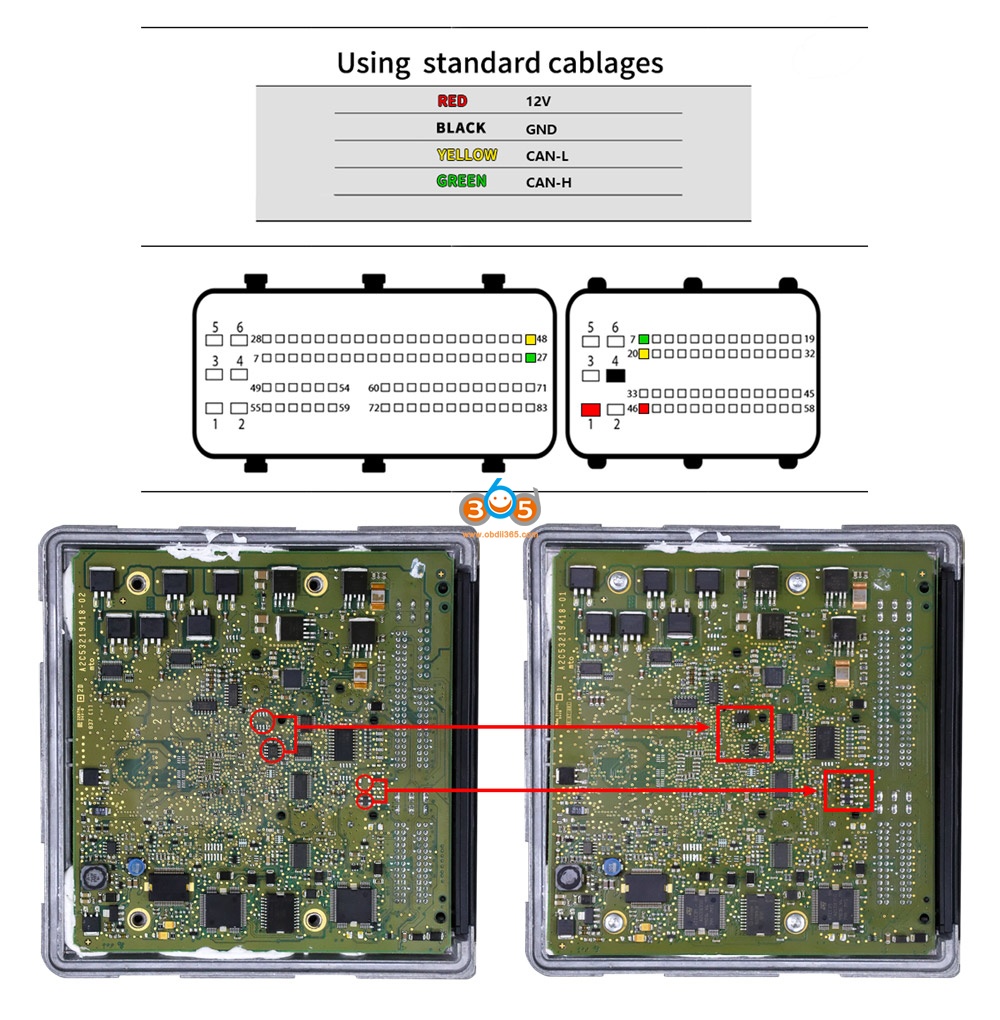
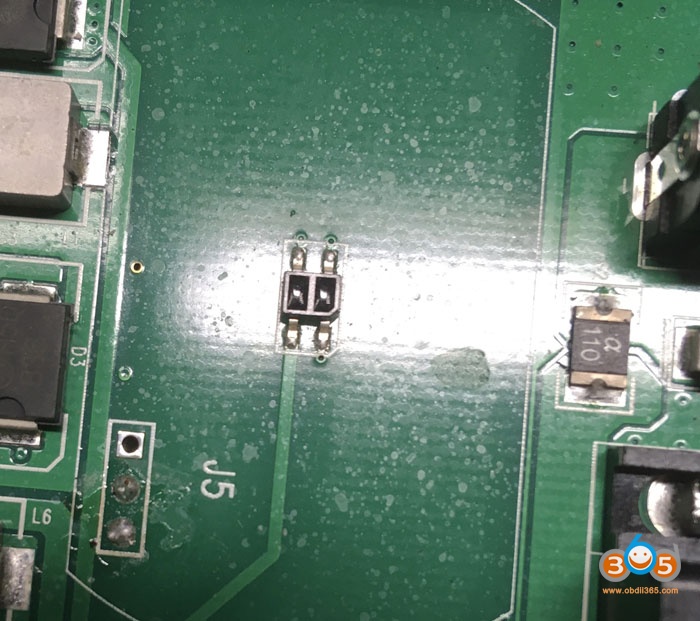
While it’s possible all these present faults could be true, it would still be unlikely so I decided to replace the DME I had used the AT-200 to replace other ECUs without issue and very easily (MSV80 license is required), however, the MSV80 instructions involves soldering chips on to the board and the instructions are just a small resolution image.  I did not know the orientation of the TJA1050 so I used a multimeter and the data sheet of the chip to determine the correct orientation on the board via voltage and ground.  For the other small resistors I did not know the size and ordered them based on guess and parameters given.  They are 1.6mm in length.  I also had to add another CAN-H and CAN-L wire to my AT-200 plug.


Chips I used: 

771-TJA1050T/CM118 TJA1050T/CM,118, 594-MCT06030D2201BP1 MCT06030

D2201BP100, 80-C603C104K5RAC3121 C0603C104K5RAC3121


After adding the chips I had no issue reading ISN, writing ISN, and for me Backup and Writing of the DME I plugged the DME in the car and started it right up without any other ISN changes to CAS or anything else.


at-200-clone-bmw-msv80-dme-1

at-200-clone-bmw-msv80-dme-2

at-200-clone-bmw-msv80-dme-3

at-200-clone-bmw-msv80-dme-4

at-200-clone-bmw-msv80-dme-5

at-200-clone-bmw-msv80-dme-6

Good to know:

  1. Please make the connections shown in the above image 4, because someone feedback he tried to identify the ecu he get the error: connection failed.


  1. You are at your own responsible for any risk when you make the connections by following the above images, because it is from one AT200 user @ wase17.


Alright, hope this article helps those in need and who are curious about this AT-200 ECU Programmer.

2/01/2021

CGDI BMW FEM BDC Version Not Supported Solution

Dear CGDI Prog BMW Programmer users: During the past days, some locksmiths feedback that when they click on “FEM /BDC key matching”, they receive a prompt “FEM BDC Version is not supported, please upgrade FEM /BDC first”, if you have the same problem, please follow this guide to solve it.

cgdi-bmw-fem-not-supported-solution-1

Please upgrade FEM /BDC first”, please Check the BTLD version, If it is 82 or 83 , you need to go to program page .advanced mode , program it (in this article). If it is other version , you need to go to program page, program it with default version (will make a manual ).


Choose BDC_Body, then “Advanced mode”.

Follow the prompt ” The ECU is about to be programmed. Please ensure that the car battery has enough power and keep the device cable connected during the programming process. Click on “Yes” to continue.


Click on “Yes” to backup the coded data.

The progress will be displayed in the box.

cgdi-bmw-fem-not-supported-solution-2


Next is BMW F series programming version selection, please choose “BTLD-80”, the next one is to choose “SWFL -80”.

Then click on “Confirm”.

cgdi-bmw-fem-not-supported-solution-3

cgdi-bmw-fem-not-supported-solution-4

Retrieving and downloading the list of programming files from the server, please be patient, how much time to cost, it will depend on your internet speed.

When it shows 100%, you will be asked to enter VIN 17 characters.

cgdi-bmw-fem-not-supported-solution-5


Ready to program ECU…It will take about 8 minutes.

When it shows 100%, it means ECU programming successfully.

cgdi-bmw-fem-not-supported-solution-6


Note 1. If you have not coded after programming, please use the “BMW F/G system Coding” function to code. Some modules (such as gateways) do not require coding and you can ignore this step.

Note 2. If the airbag, sunroof and window are abnormal, please use the “ECU initialization” function to initialize.

cgdi-bmw-fem-not-supported-solution-7

cgdi-bmw-fem-not-supported-solution-8

Then check it in the Add Key page, it can work now.

cgdi-bmw-fem-not-supported-solution-9


CGDI BMW Key Programmer tech support: www.obdii365.com


1/11/2021

CG Keys Not Read or Written to CGDI MB DIY Solution

The last batch of CG keys was not read or written to the CGDI MB. The manufacturer CGDI MB recommends replacing the IR receiver and transmitter.


Here's the customer's good working experience on solving this issue.

There was neither time nor desire to buy it and wait. Therefore, I tried to install the IR receiver and transmitter from an old faulty original key. Now CGDI MB reads and writes perfectly again !!!

fix-cg-mb--key-1

fix-cg-mb--key-2

fix-cg-mb--key-3

fix-cg-mb--key-4

Regular keys labeled CG. Of the five keys, only one key was recorded from the fifth time. After replacing IR light and photo diodes, the keys can be read and written without problems.

http://www.key-programmer.org/2021/01/12/solved-cgdi-keys-not-read-or-written-to-cgdi-mb/

1/04/2021

AT-200 Programmer Software Update to V1.8.2

CG AT-200 ecu programmer & ISN code reader released newest software V1.8.2 (2020.12.29).


1.Added MED17/EDC17 Data processing tools(Audi/Seat/Skoda/Volkswagen(VW) 4,5 generation anti-theft) engine data analysis modification
4 generation data:VIN, CS, Status, Anti-theft, MAC, PIN
5 generation data:VIN, CS
2.Added Audi/Seat/Skoda/Volkswagen(VW)/Porsche EGS clone models:
DL382(TC1784), DL501(TC1766), DQ250(TC1766): read and write DFLASH, EXT DFLASH, PFLASH
3. Added ECU(Mini)read and write ISN, VIN: MED17.2, MEV17.2.2, MEVD17.2.2
4. Added ECU(Audi, Citroen, Mg, Seat, Skoda, Volkswagen(VW)) read and write VIN:
MED17.1, MED17.5.5
5. Fix some bugs and optimize software performance
 
 
Free download AT200 V1.8.2

12/30/2020

CGDI BMW Software V3.2.0 Adds Porsche 2M25J

 CGDI Prog BMW software update to V3.2.0.

CGDI BMW V3.2.0  NEW

(2020.12.29)

1. Software interface optimization and upgrade

2. Porsche Key Learning added 2M25J chip Learning:Read basic information, Key learning, Load EEPROM

3. CAS4 Key Match(OBD) added "Repair remote key intelligence"

4. Key Match process and display optimization

5. BMW data Repair process optimization

6. Fix some bugs and optimize software performance

12/11/2020

CGDI MB Reset Benz 7G EGS TCU


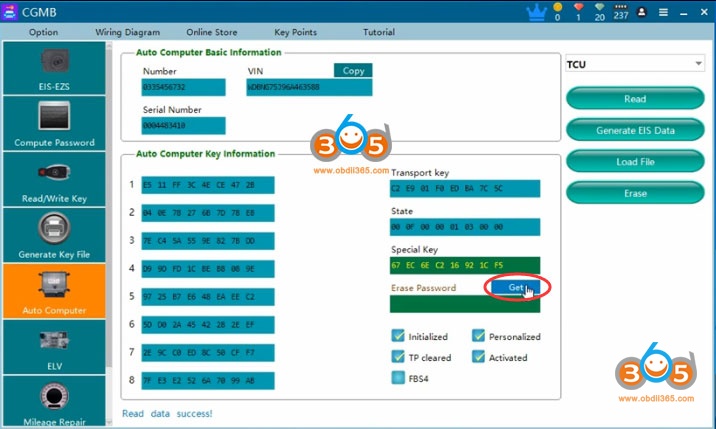
CGDI Prog MB is possible to reset/erase Mercedes-Benz 722.9 7g TCU Transmission Control Unit.  Check step-by-step instructions below:


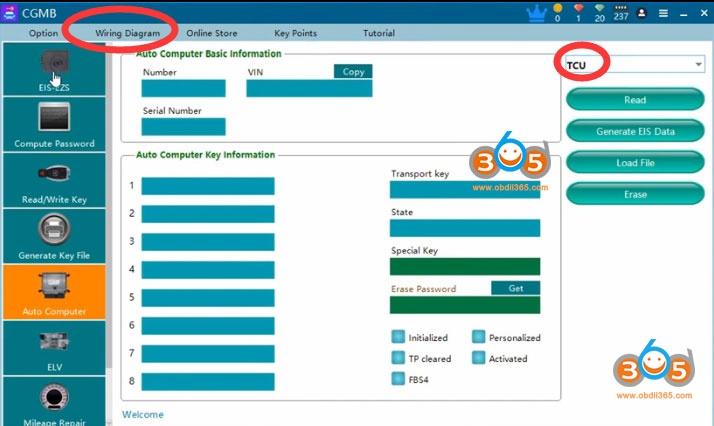
Run CGDI MB software

Select Auto Commuter function
Select engine type: TCU

cgdi-mb-reset-7g-tcu-1


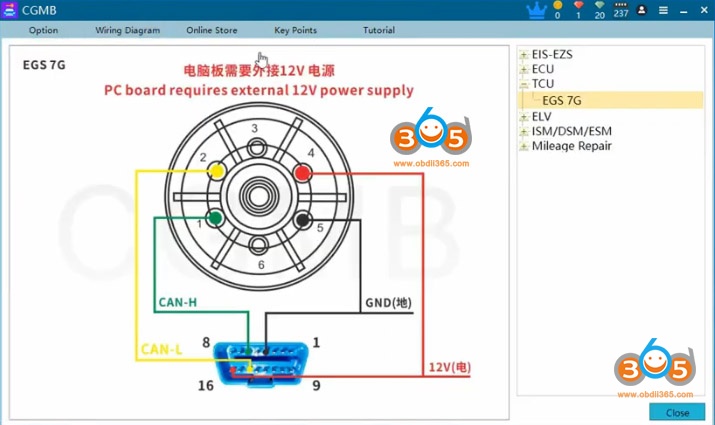
Check wiring diagram
Follow diagram to connect cgdi mb with TCU

cgdi-mb-reset-7g-tcu-2

The diagram need external 12V power. must follow the diagram . Some EGS cable that customers buy from other website can not use with CGMB.
cgdi-mb-reset-7g-tcu-3

cgdi-mb-reset-7g-tcu-4

cgdi-mb-reset-7g-tcu-5

Read TCU information

cgdi-mb-reset-7g-tcu-6


Read TCU info success

cgdi-mb-reset-7g-tcu-7


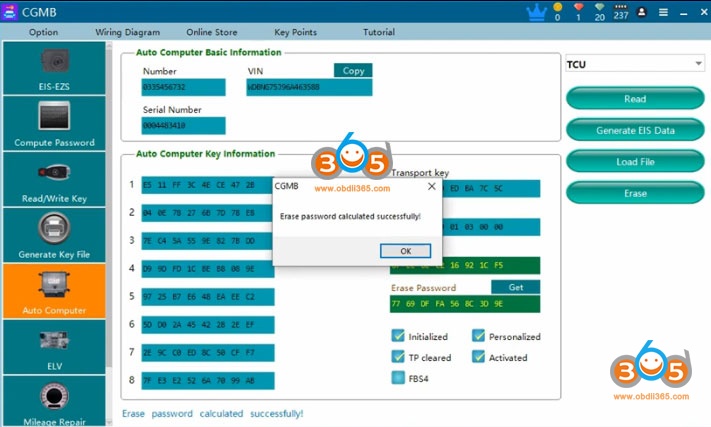
Press Get to get erase password

cgdi-mb-reset-7g-tcu-8


Calculate erase password successfully.

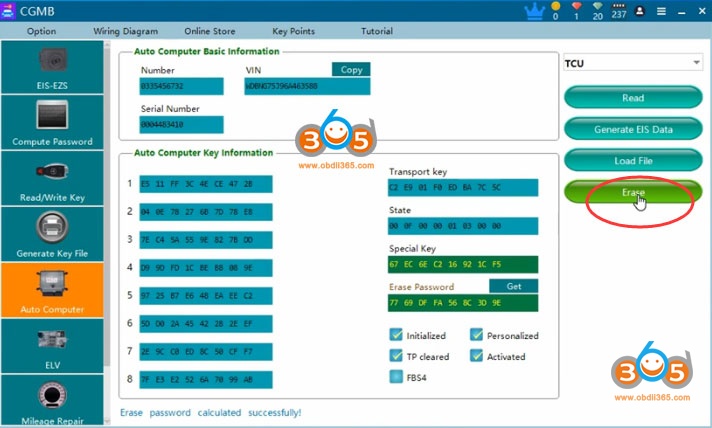
Press Erase to reset

cgdi-mb-reset-7g-tcu-9


Erase TCU success
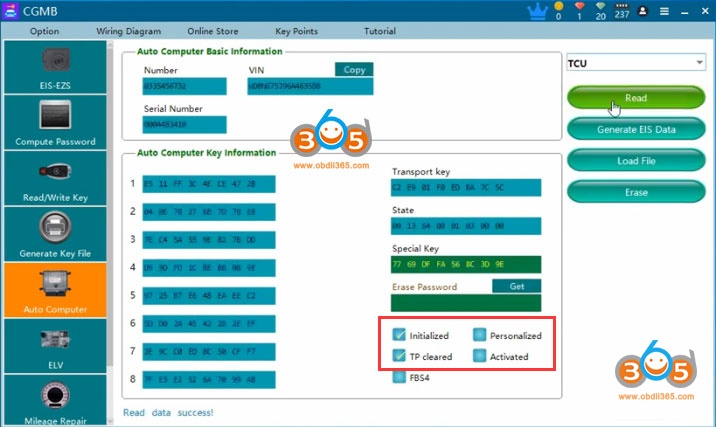
Read information again

cgdi-mb-reset-7g-tcu-10

TCU has been reset.


Note:

The EGS status , if "personalized " option not marked , "Activated " option marked,  the EGS has been erased by other tool . This status may will cause erase failure . you need to put it back to car to activate it first ,or use other tool to activate it . Then use CGMB to erase .

After software show you ''erased successfully " , you need to read the EGS status to check if it correct erase . if not , reboot your cgdi ,do it again

If erase password can not calculate , send your file to CG tech support .They can help you to calculate

After you erased succeed , install TCU back to car, need synchronize with autel, mb star diagnosis etc

12/09/2020

CGDI Prog MB Software V3.0.5.0 Update Feature

 CGDI Prog MB software update to V3.0.5.0 (21/11/2020)


CGDI MB V3.0.5.0


1. Added the function of activating the new BGA key;
   2. Improved the function of reading the new BGA key;
   3. Improved W204/212, W221 dashboard mileage repair function.
   4. Optimized the mileage repair function interface;
   5. Optimized the 639 CAN all key lost collection eis data function;
   6. Fixed the problem that some W216 eis failed to read;

8/02/2020

Solved! CG Pro “No found key” Problem

Here's the engineer solution to CG pro 9s12 programmer can not detect the key chip and shows error “No found key”.
 
1, First remove the cover with coil of the cg-pro, and place it as shown in the picture below. And then try to write key.
solve-cg-pro-no-found-key-error-1

solve-cg-pro-no-found-key-error-2

2. Write key follow cg pro prompts, if still not working, try to put the chip into these places marked red below
solve-cg-pro-no-found-key-error-3

3. Avoid touching the coil position by hand and keep the equipment stable during operation
4. Install the cgpro cover after finishing the operation.
Note: Do not break the coil. 

If problem exists, customers can try to buy and replace a L4 inductor on the CG-PRO motherboard which locates in the lower right of the USB interface.

This is old one
solve-cg-pro-no-found-key-error-4

This is new one
Inductance model: SHC0603-470m, patch 0603
solve-cg-pro-no-found-key-error-5