Showing posts with label CGDI A2. Show all posts

8/05/2026

CGDI A2 V043 Adds BYD Sea Lion 06 All Key Lost IMMO

 CGDI A2 key programmer released new software V043 on August 5th, 2026.

  1. Added Key Addition and All Keys Lost support for
    BYD Sea Lion 06.

  2. Fixed known issues with the key matching function
    for the Dongfeng Aeolus Haohan.

  3. Updated the Chinese and English operation videos
    for BMW BDC2 All Keys Lost.

  4. Optimized the automatic identification function for
    DENZA.

  5. Optimized BENZ BBA adapter-related functions.

  6. Optimized the log function for Changansuzuki.


    CGDI A2 V043 Adds BYD Sea Lion 06 All Key Lost IMMO


7/01/2026

CGDI A2 V042 Adds Subaru IMMO till 2021

 CGDI A2 key programmer released new software V042 on July 2nd, 2026.

1. Added smart key matching and free PIN Code Reading for All Vehicle Series:

MG:
MG4 EV, MG7, Mulan, MG ONE/other related models.
Roewe:
iMAX8 EV, Whale, Totoro and other related models.
2. Added key matching function:

Subaru: Baja, Brz (-2021), Crosstrek (-2021), Exiga, Forester (-2021), Impreza (-2020), Legacy (-2020), Outback (-2020), Sedan and other related models.
3. Fixed customer feedback regarding the missing USERDATA folder on BMW models.

CGDI A2 V042 Adds Subaru IMMO till 2021


6/02/2026

CGDI A2 Update Newer Ford All Keys Lost

 CGDI A2 key programmer released new immobilizer software update on June 3rd, 2026.

New Functions:
1. BMW BDC2 all keys lost programming
2. Supports add key, all keys lost and disable active alarm for newer Ford models:
EcoSport 2017-, ID49 chip
Escort 2018-
Focus 2018-
Escape 2020-
Kuga 2019-2020
Figo 2018-
Fiesta 2018-2020
KA 2018-2020

3. Supports add key, all keys lost and disable active alarm for Lincoln Corsair.
cgdi a2 bmw bdc2 ford akl

5/29/2026

CGDI A2 Update BMW G series BDC2 All Keys Lost Programming

CGDI A2 key programmer released a new BMW immobilizer software update- adds BMW G series BDC02 all keys lost programming function for free.


Tools used:

CGDI A2 key programmer

Original G key to be programmed

CG FC200 or other ECU programmers to read engine ECU data

CGDI BMW BDC2 adapter

Network connection

CGDI A2 Update BMW G series BDC2 All Keys Lost

Preparation:

Disassemble engine ECU module.

Disassemble BMW BDC02 module from the car.

cgdi a2 bmw bdc2 akl 1

Procedure:

Main steps:

1. Read vehicle information

2. Verified if the vehicle is supported or not.

Only when it shows support can you proceed to the next step.

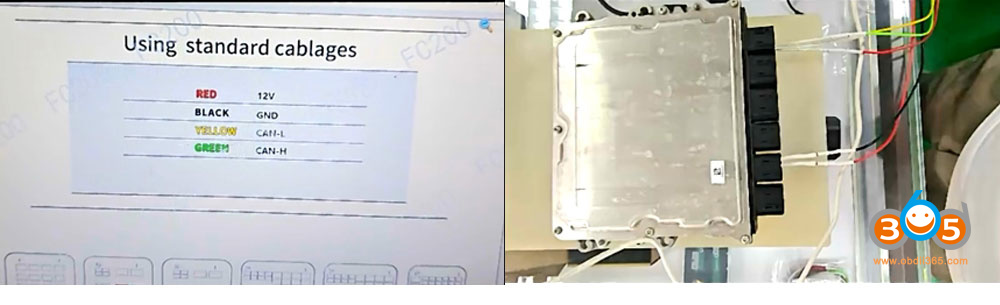
3. Read engine ECU data with CG FC200 programmer.

cgdi a2 bmw bdc2 akl 2

4. Load engine ECU to CGDI A2.

Connect CGDI A2 with PC via USB cable.

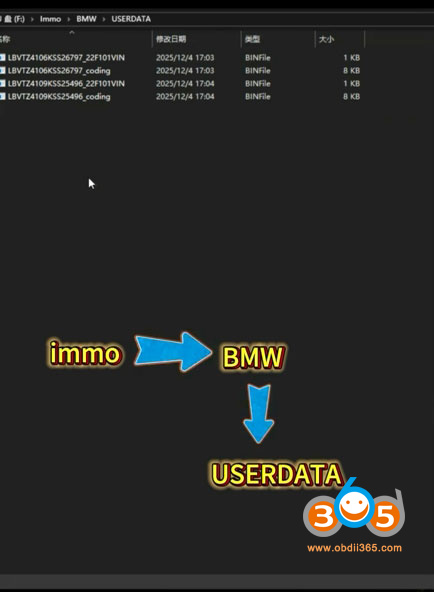
Copy and paste engine ECU data saved on desktop to CGDI A2 programmer folder (path: Immo- BMW- USERDATA)

cgdi a2 bmw bdc2 akl 3

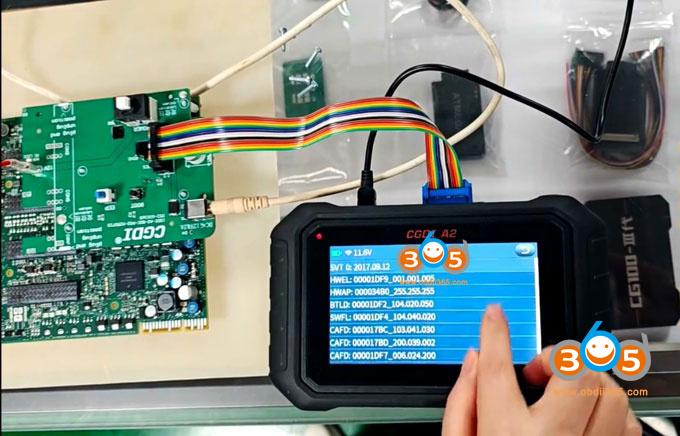
Install BMW BDC02 adapter with BDC2 module and CGDI A2 key programmer.

5. Back up coding data

cgdi a2 bmw bdc2 akl 4

6. Pre-processing ECU

7. Back up FAFP coding

8. Write immo data

9. Generate dealer key

10. Learn key. Install engine ECU and BDC2 module back to vehicle and learn key in car.

11. Write DME ISN

12. Erase EGS EWS.


www.obdii365.com

8/26/2025

CGDI A2 Adds BMW BDC2 Module Cloning Function

CGDI A2 key programmer released new IMMO software 022 on Aug. 26th, 2025.

1. Adds Mercedes Benz switch key frequency, points recharge, key points collection and exchange functions.
2. Add BMW G series BDC2 module replacement/cloning function.

CGDI A2 Adds BMW BDC2 Module Cloning Function


6/15/2025

CGDI A2 Update BMW BDC2 Key Programming

 CGDI A2 key programmer released new IMMO software update in June 2025.

1. BMW Models Added: Now supports BMW G-Chassis BDC2 key programming. Add key only, on bench mode,

2. Chery Vehicle Support added:

  • Offline PIN code reading supported — covers ACTECO/Traffic Tech, Lianchuang, Delphi, and Chery in-house immobilizer systems, plus most smart key systems.

  • Full support for Immobilizer, Smart Key, and Remote Control functions — covering 24 system types.

  • Broad model coverage including Kaiyi, Karry, Rely, Reich, Jetour, and Exeed, etc.

3. Lynk & Co Anti-theft Functionality Added

Now supports key security features for: Lynk & Co 01, 02, 03, 05, and 06.

4. Improved Brand Interface.

CGDI A2 Update BMW BDC2 Key Programming


6/10/2025

How to Add BMW BDC2 Key with CGDI A2 Key Programmer?

CGDI A2 universal key programmer released BMW G series BDC2 key programming (add key only) function in June 2025.

Here we will show how to add a spare BMW BDC2 key using CGDI A2.


Tools required:

  • CGDI A2 key programmer (with BBA adapter)
  • BMW BDC2 interface board adapters (coming soon)
  • Original BDC2 key
  • New BDC2 key to be programmed (OEM or aftermarket key)
  • 12V power supply


Main steps:

  • Back up coding
  • Pre-process ECU
  • Generate dealer key
  • Learn key


Procedure:

Step 1:  Back up coding.

Connect CGDI A2 key programmer with vehicle via OBD connector.

If you have removed the BDC2 module, set up bench connection using BDC2 test platform cable.

Here we will do it on bench. CGDI A2 will back up coding via OBD as well.

How to Add BMW BDC2 Key with CGDI A2 1

Go to IMMO function- BMW- Manual Selection- BDC Immobilizer (G Series).

How to Add BMW BDC2 Key with CGDI A2 2

BDC2 Function List:

  • Vehicle information
  • Version detect
  • Vehicle frequency
  • ECU reset
  • Coding operation
  • Programming operation
  • Key operation
  • Clear code operation
  • Special function

Go to Coding Operation Backup coding.

The function backs up the current ECU coding data through the OBD connector (or bench).

How to Add BMW BDC2 Key with CGDI A2 3

How to Add BMW BDC2 Key with CGDI A2 4
Backup is completed, remove the BDC2 module from the vehicle and perform pre-processing procedure.

How to Add BMW BDC2 Key with CGDI A2 5

How to Add BMW BDC2 Key with CGDI A2 6

Step 2: ECU Pre-processing 

Disassemble BDC2 modules, remove fuses, unsrew screws.
Connect the BDC2 interface adapter to the BDC2 motherboard.
Connect the flat cable to the CGDI A2 host.

How to Add BMW BDC2 Key with CGDI A2 7

How to Add BMW BDC2 Key with CGDI A2 8

Select Programming operation ECU Preprocessing.
Confirm you have backed up coding, otherwise you will not be able to restore SWFL and coding.

How to Add BMW BDC2 Key with CGDI A2 9
The process takes about 10 minutes.
Disconnect the EEP switch, then click OK to continue.

How to Add BMW BDC2 Key with CGDI A2 10
Connect the DC 12V power supply and turn on the power switch.

How to Add BMW BDC2 Key with CGDI A2 11
Boot programming in progress.

How to Add BMW BDC2 Key with CGDI A2 12
Disconnect DC 12V power supply.
Connect the EEP switch, click OK to continue.
Connect the DC 12V power supply and turn on the power switch.

Disconnect the EEP switch, does not disconnect 12V power supply.
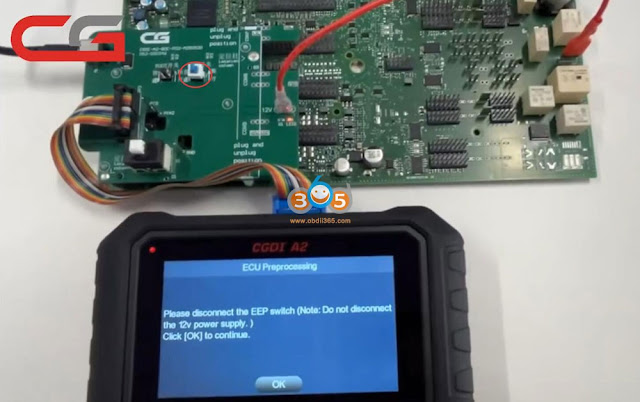
How to Add BMW BDC2 Key with CGDI A2 13
Press the boot switch once, click OK to continue

How to Add BMW BDC2 Key with CGDI A2 14

NOTE: Strictly follow the device prompts to connect/disconnect EEP/ignition switch.

Reading FLASH data on bench.
Restoring SWFL.
Restoring coding data.

How to Add BMW BDC2 Key with CGDI A2 15

How to Add BMW BDC2 Key with CGDI A2 16

How to Add BMW BDC2 Key with CGDI A2 17

ECU pre-processing completed.

How to Add BMW BDC2 Key with CGDI A2 18

Step 3: Generate Dealer Key

Install the BDC2 module back to the vehicle (or set up bench connection with BDC2 test platform cable).
Turn on the ignition switch.

Check whether the center console time display is normal and the rearview mirror can be folded automatically. If abnormal, adjust the control manually.

Select Key Operation.
Read key status.

Read key ID and frequency information successfully. The original key is 433 MHz.

How to Add BMW BDC2 Key with CGDI A2 19

How to Add BMW BDC2 Key with CGDI A2 20
Then connect BBA adapter with CGDI A2.
Select Read Original key.
Place a working key to the induction coil of BBA adapter.
CGDI A2 will collect the original key data.
BBA adapter POWER and RUN buttons will turn on.
Read key data successfully.

How to Add BMW BDC2 Key with CGDI A2 21

How to Add BMW BDC2 Key with CGDI A2 22

Select Generate Dealer Key Function.
Place a new key in the coil of the BBA adapter.
Select a blank key position to generate dealer key.

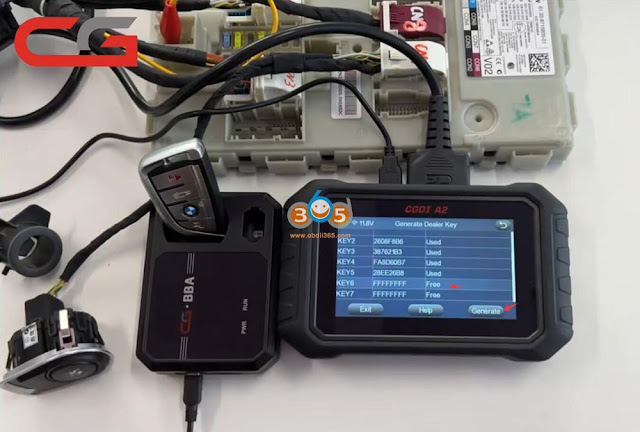
How to Add BMW BDC2 Key with CGDI A2 23

How to Add BMW BDC2 Key with CGDI A2 24

Step 4: Learn Key 

Select key operation- Learn key.

Follow CGDI A2 prompts to learn each key.

Then test key after key programming is completed.

www.obdii365.com