Showing posts with label AT-200 ecu programmer. Show all posts

4/19/2021

Read BMW ECU Mevd17.2 with CG AT200 on Bench

CG AT-200 is able to read BMW ECU Mevd17.2 on Bench in 3 minutes. Please read this article for the procedure.


F22 with N20 engine, took 2 minutes to remove from the car.

cg-at200-read-bmw-ecu-mevd17-1

Connect to one CG AT-200.

cg-at200-read-bmw-ecu-mevd17-2


Look at the wire connected with CG AT-200 and N20 engine box.

cg-at200-read-bmw-ecu-mevd17-3


Connect to one adjustable power supply which can ensure stable voltage.

cg-at200-read-bmw-ecu-mevd17-4


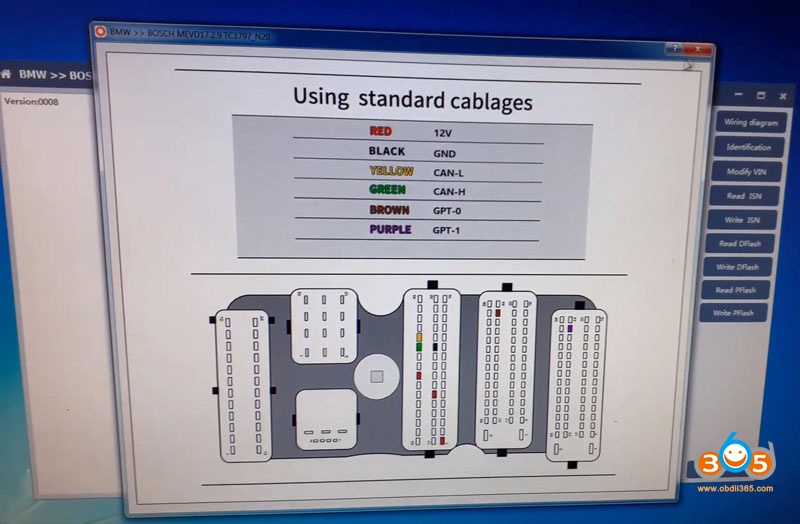
Open AT200 software, select “BMW” and search “mevd” and then select “Bosch MEVD17.2.9 TC1797_N20”.

cg-at200-read-bmw-ecu-mevd17-5


Click on “Wiring Diagram” to refer.

cg-at200-read-bmw-ecu-mevd17-6

cg-at200-read-bmw-ecu-mevd17-7

Click on “Identification” and have the results of chip, serial number, hardware ID…

cg-at200-read-bmw-ecu-mevd17-8


Click on “Read DFLASH” and save the data successfully.

cg-at200-read-bmw-ecu-mevd17-9


Click on “Read PFLASH”, CG AT-200 will take 1 minute to complete, please wait and save the data.

cg-at200-read-bmw-ecu-mevd17-10


Enjoy!


www.obdii365.com

3/02/2021

Experience with AT-200 Clone MSV80 DME

I’d like to share my experience with the AT-200 ECU Programmer and MSV80 unlock upgrade.  I had three codes on a customers’ vehicle that came in 2011 BMW 328Cic:

2E7C BSD (Bit-Serial Data Interface) data bus communications fault

2F71 Digital Motor Electronics (DME): electronics box fan, activation

2B3D Diagnostic Module Tank Leakage (DMTL), system fault


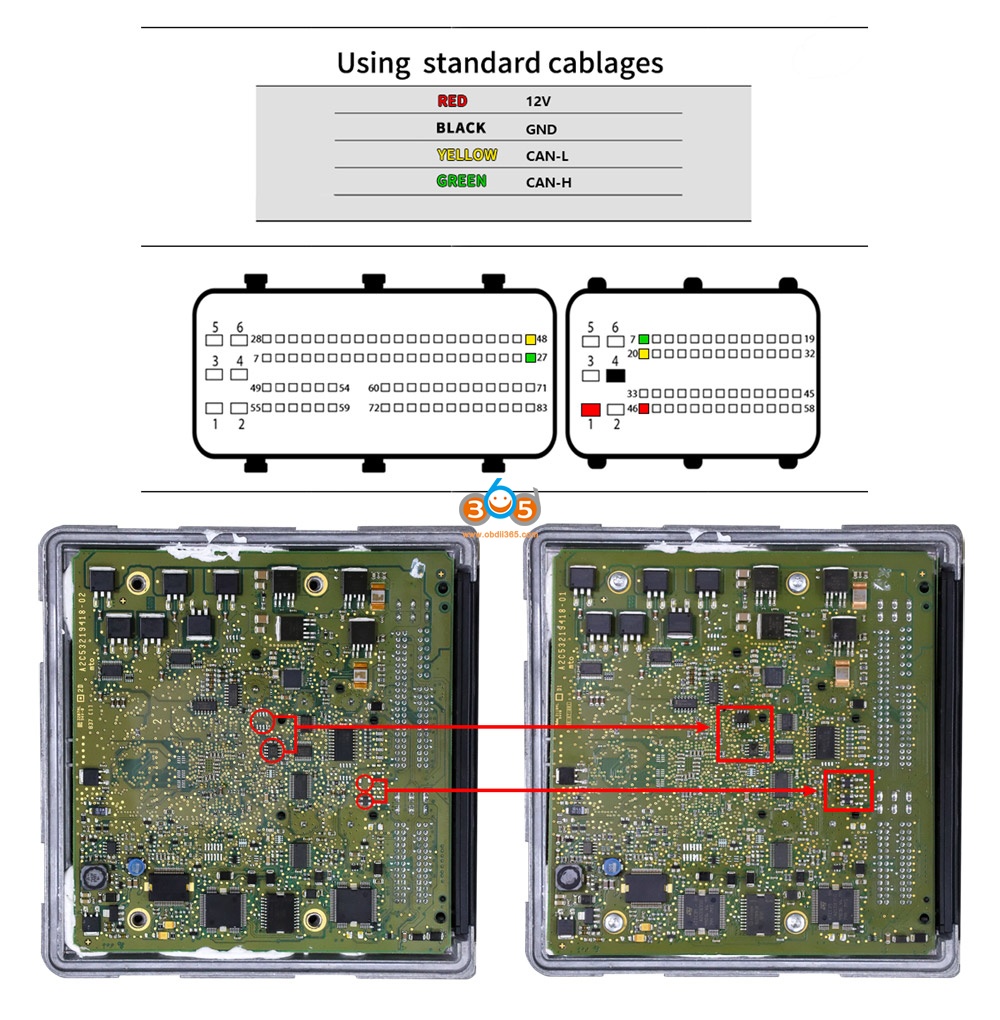
While it’s possible all these present faults could be true, it would still be unlikely so I decided to replace the DME I had used the AT-200 to replace other ECUs without issue and very easily (MSV80 license is required), however, the MSV80 instructions involves soldering chips on to the board and the instructions are just a small resolution image.  I did not know the orientation of the TJA1050 so I used a multimeter and the data sheet of the chip to determine the correct orientation on the board via voltage and ground.  For the other small resistors I did not know the size and ordered them based on guess and parameters given.  They are 1.6mm in length.  I also had to add another CAN-H and CAN-L wire to my AT-200 plug.


Chips I used: 

771-TJA1050T/CM118 TJA1050T/CM,118, 594-MCT06030D2201BP1 MCT06030

D2201BP100, 80-C603C104K5RAC3121 C0603C104K5RAC3121


After adding the chips I had no issue reading ISN, writing ISN, and for me Backup and Writing of the DME I plugged the DME in the car and started it right up without any other ISN changes to CAS or anything else.


at-200-clone-bmw-msv80-dme-1

at-200-clone-bmw-msv80-dme-2

at-200-clone-bmw-msv80-dme-3

at-200-clone-bmw-msv80-dme-4

at-200-clone-bmw-msv80-dme-5

at-200-clone-bmw-msv80-dme-6

Good to know:

  1. Please make the connections shown in the above image 4, because someone feedback he tried to identify the ecu he get the error: connection failed.


  1. You are at your own responsible for any risk when you make the connections by following the above images, because it is from one AT200 user @ wase17.


Alright, hope this article helps those in need and who are curious about this AT-200 ECU Programmer.

1/04/2021

AT-200 Programmer Software Update to V1.8.2

CG AT-200 ecu programmer & ISN code reader released newest software V1.8.2 (2020.12.29).


1.Added MED17/EDC17 Data processing tools(Audi/Seat/Skoda/Volkswagen(VW) 4,5 generation anti-theft) engine data analysis modification
4 generation data:VIN, CS, Status, Anti-theft, MAC, PIN
5 generation data:VIN, CS
2.Added Audi/Seat/Skoda/Volkswagen(VW)/Porsche EGS clone models:
DL382(TC1784), DL501(TC1766), DQ250(TC1766): read and write DFLASH, EXT DFLASH, PFLASH
3. Added ECU(Mini)read and write ISN, VIN: MED17.2, MEV17.2.2, MEVD17.2.2
4. Added ECU(Audi, Citroen, Mg, Seat, Skoda, Volkswagen(VW)) read and write VIN:
MED17.1, MED17.5.5
5. Fix some bugs and optimize software performance
 
 
Free download AT200 V1.8.2

5/07/2020

How to Read BMW G Series B48 ISN with AT-200?

CG AT-200 ecu programmer newly updated BMW F and G series B48 B58 ISN reading, EEPROM & FLASH data reading and writing on bench mode.

Example:
AT-200 read B48 G series ISN on bench

Read ISN
Select Brand BMW-> BMW-MG1CS002/MG1CS003_B48/B58_G in AT200 software
at200-read-bmw-b48-isn-1
Check wiring diagram to at200
at200-read-bmw-b48-isn-2
Connect B48 DME ecu with AT-200 via tester cable
at200-read-bmw-b48-isn-3

at200-read-bmw-b48-isn-4

at200-read-bmw-b48-isn-5
Identify DME information
(click to enlarge images)
at200-read-bmw-b48-isn-6
Read ISN
at200-read-bmw-b48-isn-7
Read B48 ISN code successfully.

Read EEPROM & Flash
Press Read EEPROM
Reading eeprom in process
at200-read-bmw-b48-isn-8
Save EEPROM data
at200-read-bmw-b48-isn-9
Press Read Flash
at200-read-bmw-b48-isn-10
Save Flash data
at200-read-bmw-b48-isn-11

Write EEPROM & Flash
Select Write EEPROM and press Yes to write data
Make sure data is backed up.
at200-read-bmw-b48-isn-12
Choose EERPOM bin file save previously
at200-read-bmw-b48-isn-13
Writing EEPROM in process
at200-read-bmw-b48-isn-14
Write EEPROM success
at200-read-bmw-b48-isn-15
Press Write Flash and press Yes to continue
at200-read-bmw-b48-isn-16
Upload flash data saved
at200-read-bmw-b48-isn-17
Write Flash success.
at200-read-bmw-b48-isn-18


3/23/2020

AT-200 Software Update to V1.7.0

CG AT-200 ISN code reader and ecu programmer software update to V1.7.0

Version: [1.7.0] update log
date: 2020-3-20
content:
1. Software interface optimization and upgrading:
1.1. Wiring diagram display 
1.2. Font size 
1.3. Menu display (classified display, consolidated display) 
1.4. Added search function 
1.5. Added help button 
2. Added the engine type:
2.1. Added TC1766: Can-Am, KTM, Piaggio;
2.2. Added TC1767: Lincoln;
2.3. Added TC1797: Artec, Fendt, New Holland;
3. Repair some Bosch engine write abnormal problems
4. Optimized car diagram:
BOSCH EDC17C10, BOSCH EDC17C41, BOSCH EDC17CP45, BOSCH EDC17CP48 ver2, BOSCH EDC17CP48, BOSCH MED17.9.3
5. Added Traditional Chinese language

http://www.obdii365.com/wholesale/bmw-at200-ecu-programmer.html

11/28/2019

How to Clone BMW B38 ISN ECU usign AT-200 Programmer

AT-200 ecu programmer & ISN code reader supports over 1280 ECUs, including BMW MSV90,MSVD85, MSVD85.1,MSVD85.2, MSVD87, MSVD87.2, N13, N55, N20, B38,B48 etc.
Here’s the guide to read and write B38 ISN using AT-200 on bench.
1) Read ISN
2) Modify ISN
3) Module cloning
at-200-clone-bmw-b38-isn-1
In AT-200 software, select BMW model and Engine ECU type
i.e Select BMW 1 series 116i B38815A 109 Bosch MEVD17.2.K TC1793
Choose Bench mode
at-200-clone-bmw-b38-isn-2
Check wiring diagram
at-200-clone-bmw-b38-isn-3
Connect ECU with AT200 via tuning adapter follow the wiring (adapter comes with the at200 programmer)
at-200-clone-bmw-b38-isn-4

at-200-clone-bmw-b38-isn-5
Identify ECU type
at-200-clone-bmw-b38-isn-6
Press Read ISN
at-200-clone-bmw-b38-isn-7
Read ISN successfully
Select Write ISN
at-200-clone-bmw-b38-isn-8
Manually enter new ISN value and press OK to continue
at-200-clone-bmw-b38-isn-9
Write ISN successfully
at-200-clone-bmw-b38-isn-10
at-200-clone-bmw-b38-isn-11
Module cloning (clone ECU)
Press Read Dflash 
at-200-clone-bmw-b38-isn-12
Save Dflash data
Select Read Pflash
at-200-clone-bmw-b38-isn-13
at-200-clone-bmw-b38-isn-14
Reading  pflash in process
at-200-clone-bmw-b38-isn-15
Save Pflash.