Showing posts with label CGDI Prog. Show all posts

9/07/2021

CGDI BMW Reset BMW E series 6HP EGS ISN

There is a new update on CGDI Prog BMW software- adding E series ZF6HP EGS ISN Reset.


This is a BMW E70 2008. ICOM ISTA+ shows a fault code error 5123 EGS (5123 egs : immobilizer in transmission control disables). It can be fixed by CGDI BMW, no need to do anything with CAS.

cgdi bmw reset e series egs isn 1

Run CGDI BMW software

Go to Other function- BMW EGS Change – 6HP (E series)- Bench –

cgdi bmw reset e series egs isn 2

cgdi bmw reset e series egs isn 3

cgdi bmw reset e series egs isn 4

cgdi bmw reset e series egs isn5

Check EGS status.

EGS ISN exits: Yes

EGS matches the CAS, no

cgdi bmw reset e series egs isn 6

Select Clear EGS ISN

cgdi bmw reset e series egs isn 7

Read EGS ISN

cgdi bmw reset e series egs isn 8

Input ISN code to erase

cgdi bmw reset e series egs isn 9

CGDI Prog BMW Clear E series 6HP ISN successfully.

Current EGS has no ISN code

cgdi bmw reset e series egs isn 10

Check EGS status again

EGS ISN does not exit

EGS matches the CAS system.

cgdi bmw reset e series egs isn 11

Done.

 www.obdii365.com

http://blog.obdii365.com/2021/09/07/cgdi-prog-bmw-reset-e-series-e70-e71-6hp-egs-isn/

7/06/2021

Mercedes W204 used ELV Adaptation Tips bby CGDI MB

Problem:

Mercedes W204 used ELV adaptation with CGDI MB.

hi i need some help...i saw the tutorials but they seem contradicting...i wiped second hand w204 elv...then wiped the eis...wrote back the saved data and then synced the evl from the eis tab...only when i read the evl data all seems in order but the activated tab remains unticked....is that typical or am i doing something wrong?


Solution:

It is so simply.

1. read EIS and get key password, save the EIS data.
2. wipe both ELV and EIS
3. write EIS data to EIS (don't insert key after write completed)
4. sync ELV with EIS
5. insert key, that will activate both EIS and ELV. 

5/18/2021

DIY Change CGDI MB IR transmitter and receiver

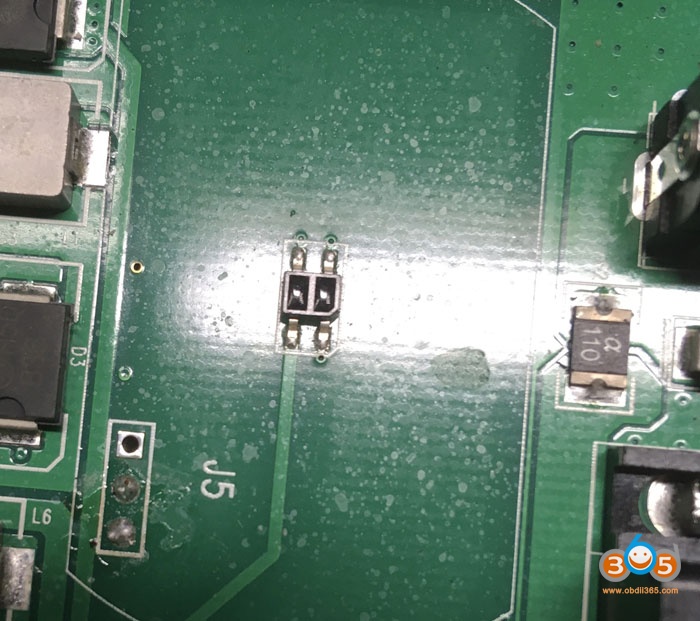
The last batch of CG keys was not read or written to the CGDI MB. The manufacturer CGDI MB recommends replacing the IR receiver and transmitter. There was neither time nor desire to buy it and wait. Therefore, I tried to install the IR receiver and transmitter from an old faulty original key. Now CGDI MB reads and writes perfectly again !!!

Change CGDI MB IR transmitter and receiver 1

Change CGDI MB IR transmitter and receiver 2

Change CGDI MB IR transmitter and receiver 3

Change CGDI MB IR transmitter and receiver 4

Regular keys labeled CG. Of the five keys, only one key was recorded from the fifth time. After replacing IR light and photo diodes, the keys can be read and written without problems.

Change CGDI MB IR transmitter and receiver 5


Alright, this is very useful experience shared by @ EduardNN, hope it helps if you have the same problem when you use CGDI MB programmer with BE key.


http://blog.obdii365.com/2021/05/19/change-ir-transmitter-and-receiver-in-cgdi-mb/

4/30/2021

CGDI BMW V3.2.1.0 Adds BMW E Series 6HP EGS

CGDI Prog BMW key programmer software update to V3.2.1.0. 

(2021.04.28)

1. BMW EGS Change: Added 6HP(E):

(1)Read EGS ISN, EGS status, Reset adaptation, Modify VIN, ECU reset

(2)Some EGS supports 'Read EGS ISN': 7576211, 7572988, 7582344, 7582348, 7567223, 7567224, 7567406, 7568222, 7572416, 7573660, 7575795, 7575796, 7591972, 7605219, 7606220, 7591971, 7599827, 7607116

2. CAS Mileage Reset: Added 'Sync ELV'

3. N13/N20/N55/B38 Read/Write ISN:

(1)Added 'Modify VIN'

(2)Added type: EDC17C06, MEVD17.2.8

4. FEM/BDC Key Match: Add 00002419.082_010_030, 00002419.083_010_010 two versions of FEM/BDC with key

5. BMW Diagnosis: updated version DIAG_4.28.12

6. Display optimization: BMW Data Repair, CAS1-3+ Key Match(OBD), BMW F/G Series Program

7. Technical support video update

8. Fix some bugs and optimize software performance

2/01/2021

CGDI BMW FEM BDC Version Not Supported Solution

Dear CGDI Prog BMW Programmer users: During the past days, some locksmiths feedback that when they click on “FEM /BDC key matching”, they receive a prompt “FEM BDC Version is not supported, please upgrade FEM /BDC first”, if you have the same problem, please follow this guide to solve it.

cgdi-bmw-fem-not-supported-solution-1

Please upgrade FEM /BDC first”, please Check the BTLD version, If it is 82 or 83 , you need to go to program page .advanced mode , program it (in this article). If it is other version , you need to go to program page, program it with default version (will make a manual ).


Choose BDC_Body, then “Advanced mode”.

Follow the prompt ” The ECU is about to be programmed. Please ensure that the car battery has enough power and keep the device cable connected during the programming process. Click on “Yes” to continue.


Click on “Yes” to backup the coded data.

The progress will be displayed in the box.

cgdi-bmw-fem-not-supported-solution-2


Next is BMW F series programming version selection, please choose “BTLD-80”, the next one is to choose “SWFL -80”.

Then click on “Confirm”.

cgdi-bmw-fem-not-supported-solution-3

cgdi-bmw-fem-not-supported-solution-4

Retrieving and downloading the list of programming files from the server, please be patient, how much time to cost, it will depend on your internet speed.

When it shows 100%, you will be asked to enter VIN 17 characters.

cgdi-bmw-fem-not-supported-solution-5


Ready to program ECU…It will take about 8 minutes.

When it shows 100%, it means ECU programming successfully.

cgdi-bmw-fem-not-supported-solution-6


Note 1. If you have not coded after programming, please use the “BMW F/G system Coding” function to code. Some modules (such as gateways) do not require coding and you can ignore this step.

Note 2. If the airbag, sunroof and window are abnormal, please use the “ECU initialization” function to initialize.

cgdi-bmw-fem-not-supported-solution-7

cgdi-bmw-fem-not-supported-solution-8

Then check it in the Add Key page, it can work now.

cgdi-bmw-fem-not-supported-solution-9


CGDI BMW Key Programmer tech support: www.obdii365.com


1/11/2021

CG Keys Not Read or Written to CGDI MB DIY Solution

The last batch of CG keys was not read or written to the CGDI MB. The manufacturer CGDI MB recommends replacing the IR receiver and transmitter.


Here's the customer's good working experience on solving this issue.

There was neither time nor desire to buy it and wait. Therefore, I tried to install the IR receiver and transmitter from an old faulty original key. Now CGDI MB reads and writes perfectly again !!!

fix-cg-mb--key-1

fix-cg-mb--key-2

fix-cg-mb--key-3

fix-cg-mb--key-4

Regular keys labeled CG. Of the five keys, only one key was recorded from the fifth time. After replacing IR light and photo diodes, the keys can be read and written without problems.

http://www.key-programmer.org/2021/01/12/solved-cgdi-keys-not-read-or-written-to-cgdi-mb/

12/30/2020

CGDI BMW Software V3.2.0 Adds Porsche 2M25J

 CGDI Prog BMW software update to V3.2.0.

CGDI BMW V3.2.0  NEW

(2020.12.29)

1. Software interface optimization and upgrade

2. Porsche Key Learning added 2M25J chip Learning:Read basic information, Key learning, Load EEPROM

3. CAS4 Key Match(OBD) added "Repair remote key intelligence"

4. Key Match process and display optimization

5. BMW data Repair process optimization

6. Fix some bugs and optimize software performance

12/11/2020

CGDI MB Reset Benz 7G EGS TCU


CGDI Prog MB is possible to reset/erase Mercedes-Benz 722.9 7g TCU Transmission Control Unit.  Check step-by-step instructions below:


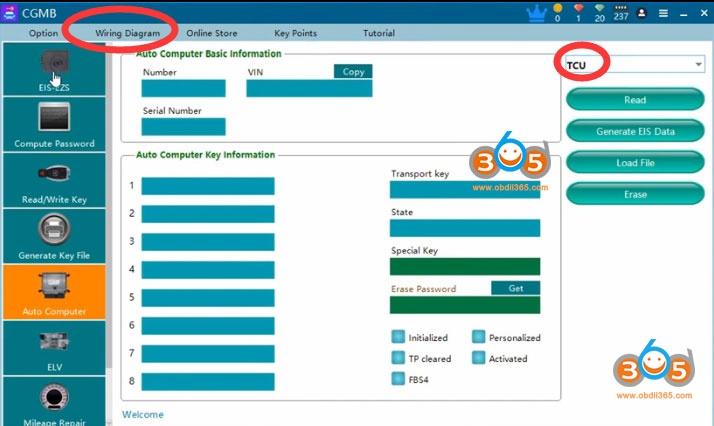
Run CGDI MB software

Select Auto Commuter function
Select engine type: TCU

cgdi-mb-reset-7g-tcu-1


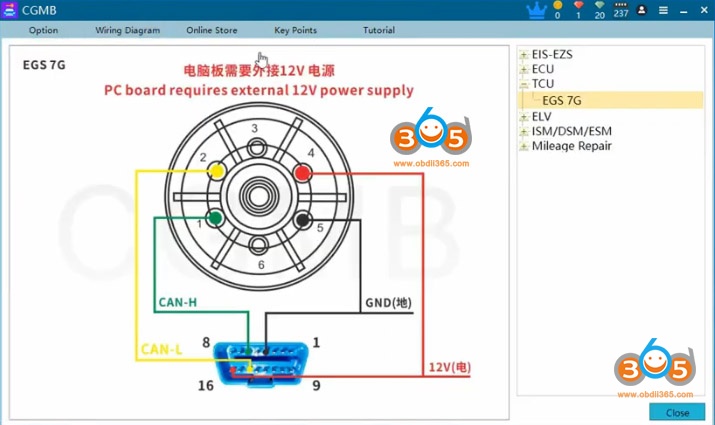
Check wiring diagram
Follow diagram to connect cgdi mb with TCU

cgdi-mb-reset-7g-tcu-2

The diagram need external 12V power. must follow the diagram . Some EGS cable that customers buy from other website can not use with CGMB.

cgdi-mb-reset-7g-tcu-3

cgdi-mb-reset-7g-tcu-4

cgdi-mb-reset-7g-tcu-5

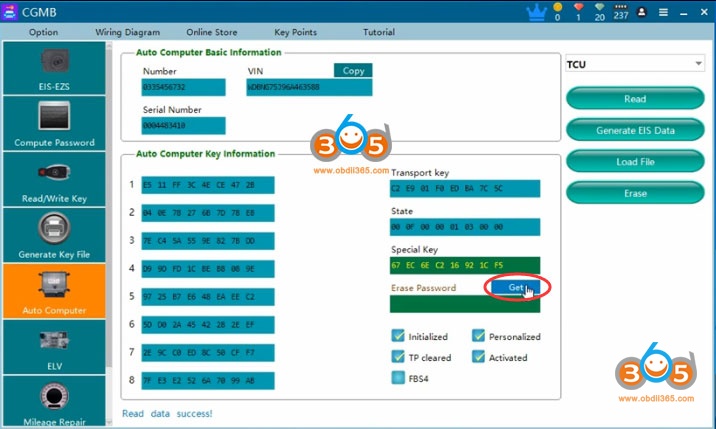
Read TCU information

cgdi-mb-reset-7g-tcu-6


Read TCU info success

cgdi-mb-reset-7g-tcu-7


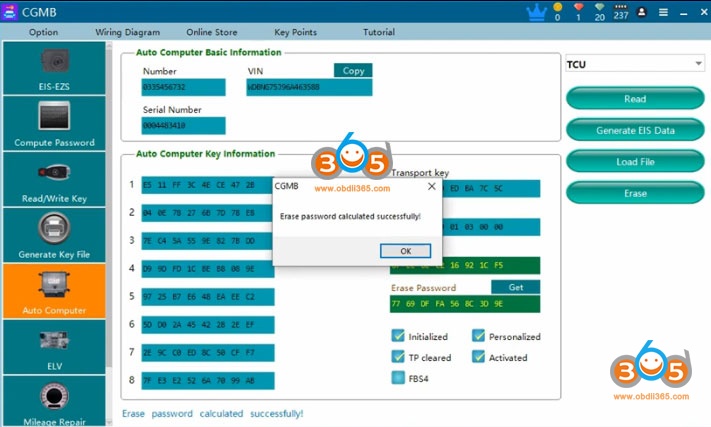
Press Get to get erase password

cgdi-mb-reset-7g-tcu-8


Calculate erase password successfully.

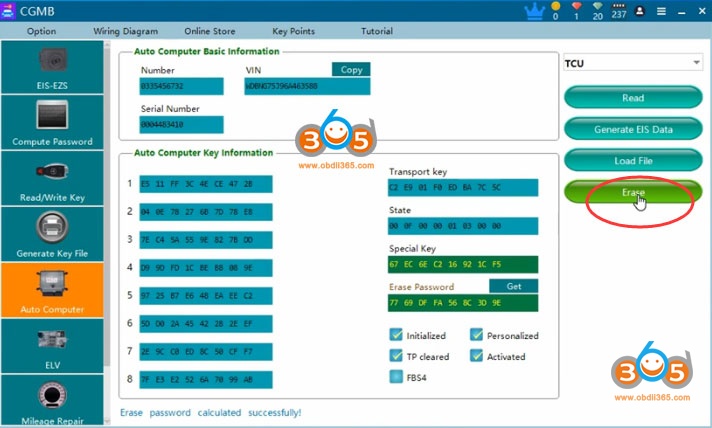
Press Erase to reset

cgdi-mb-reset-7g-tcu-9


Erase TCU success
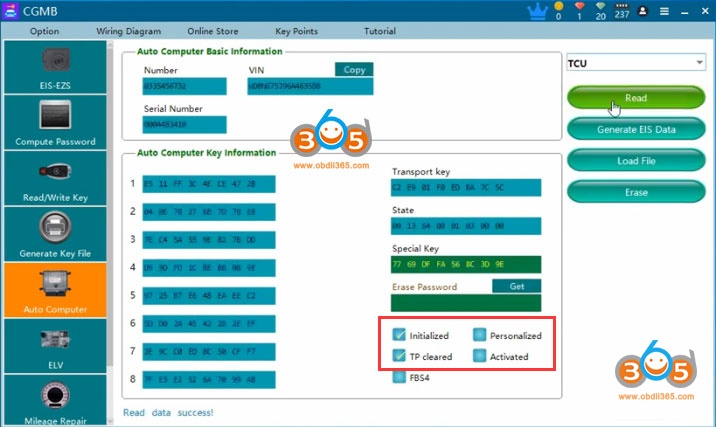
Read information again

cgdi-mb-reset-7g-tcu-10

TCU has been reset.


Note:

The EGS status , if "personalized " option not marked , "Activated " option marked,  the EGS has been erased by other tool . This status may will cause erase failure . you need to put it back to car to activate it first ,or use other tool to activate it . Then use CGMB to erase .

After software show you ''erased successfully " , you need to read the EGS status to check if it correct erase . if not , reboot your cgdi ,do it again

If erase password can not calculate , send your file to CG tech support .They can help you to calculate

After you erased succeed , install TCU back to car, need synchronize with autel, mb star diagnosis etc

12/09/2020

CGDI Prog MB Software V3.0.5.0 Update Feature

 CGDI Prog MB software update to V3.0.5.0 (21/11/2020)


CGDI MB V3.0.5.0


1. Added the function of activating the new BGA key;
   2. Improved the function of reading the new BGA key;
   3. Improved W204/212, W221 dashboard mileage repair function.
   4. Optimized the mileage repair function interface;
   5. Optimized the 639 CAN all key lost collection eis data function;
   6. Fixed the problem that some W216 eis failed to read;

8/02/2020

CGDI MB W205 W222 W447 FBS4 Cluster Version List

Question before starting: 
Does CGDI MB support Mercedes FBS4 W447 cluster mileage reset?


Solution: 
Yes. But not all W447 cluster versions.
Check CGDI Prog MB supported Mercedes FBS4 instrument cluster type list.
ChassisMileage Repair MethodInstrument
Cluster Version
W205Software Filter Version2059023013
2059023103
2059024618
2059025708
2059028308
2059028411
2059028504
2059028711
2059028817
2059029414
2059029514
Hardware Filter Version2059021304
2059022204
2059024001
2059024803
2059026002
2059028700
2059029614
2059029704
Restore Factory Setting Version2059021419
2059024318
2059026418
W222Software Filter Version2229021310
2229022310
2229022610
2229023515
2229026114
2229028210
2229029511
W447Software Filter Version4479023804
4479024005
4479026202
4479026604
Hardware Filter Version4479024006
4479024202
4479026904
4479029506
Note: Dash Chip R7F701414 is not supported currently.
*The cluster version is modified till June 2020. Keep updating more versions in the feature.
cgdi-mb-benz-fbs4-mileage-repair-1

cgdi-mb-benz-fbs4-mileage-repair-2

cgdi-mb-benz-fbs4-mileage-repair-3
Note:
1).
FBS4 mileage repair license and extend adapter is required in order to repair mileage for MB FBS4 cluster.
2).
How to Check FBS4 cluster version?
The instrument version can be judged by the P2 position version of the instrument before year 2018.
cgdi-mb-benz-fbs4-mileage-repair-version


7/27/2020

How to use CGDI BMW to Repair CAS Data?

Device: CGDI Prog BMW key programmer
Function: BMW Data repair
Explanation: 
Supports modifying  ISN, VIN and frequency in the CAS data
Supports modifying the ISN, VIN in ECU data, N13, N20, N55 and B38 DME
The corresponding data type must be manually selected to modify the corresponding data otherwise an error will be reported.
cgdi-bmw-data-repair-function-1

cgdi-bmw-data-repair-function-2
How to know whether CAS data is encrypted? 
Use CG pro to read CAS data (CGDI BMW can read CAS4/CAS4+ data)
CAS1 CAS2 CAS3 CAS4 modify data
The CAS data is not encrypted, the CAS ISN and ECU ISN are the same.
How to replace CAS data?
The CAS data of car A is broken. You can find car B CAS data same model as car A. We only need  to change data of the frequency of the CAS data of car B, VIN and ISN to be the same as car A.
Remember to add key again.

Example: CAS3 data repair
Select data type: CAS3
cgdi-bmw-repair-cas3-data-1
Load eeprom data (i.e CAS3 0L01Y eeprom.bin)
cgdi-bmw-repair-cas3-data-2

change/modify VIN and CAS ISN
cgdi-bmw-repair-cas3-data-3

cgdi-bmw-repair-cas3-data-4
Save data
cgdi-bmw-repair-cas3-data-5
CAS3+ CAS4+ modify data
CAS3+ CAS4+ data is encrypted
cgdi-bmw-repair-cas4-data-1
For example CAS4+ data repair:
Select data type: CAS4
load eeprom data (i.e CAS4+ 5M48H.bin)
cgdi-bmw-repair-cas4-data-2

The current data is CAS for encrypted version data. Do you need to decrypt the ISN?
cgdi-bmw-repair-cas4-data-3
Click “No” will show you CAS ISN
cgdi-bmw-repair-cas4-data-4

Click “Yes” will show you ECU ISN
You will be tipped to put the key of the original car into the CGDI BMW coil; At this point, the car key of the data itself should be put in. (car A puts car A key, car B data put car B key). Or enter the corresponding key synchronization code. (if the key synchronization code is entered incorrectly).
cgdi-bmw-repair-cas4-data-5
Input the car key in the coil of cgdi bmw
cgdi-bmw-repair-cas4-data-6

Enter the original key data and confirm

How to replace encrypted CAS data?
Car A CAS data is broken, you can find car B CAS data same model as car A. You need the ECU ISN of car A, because the encrypted data CAS ISN is not consistent with car B,  then change the data as car A at the same frequency and the VIN.
That is, after loading the encrypted data of ar B, click No to show the CAS ISN of car B, and then write the ECU ISN of car A to the location of CAS ISN. Then modify frequency is the same as car A.
Save data, write it to car A. Remember to add key again.
cgdi-bmw-replace-encrypted-cas-data-1
Check key information
Select data type: CAS4, load eeprom data
Press not to decrypt the ISN
Select remote frequency: 868MHz
Manually modify/change VIN and paste DME ISN here
cgdi-bmw-replace-encrypted-cas-data-2
Press Yes to encrypt ISN
Select Modify ISN function
Press Yes to encrypt ISN
cgdi-bmw-replace-encrypted-cas-data-3
Save data
cgdi-bmw-replace-encrypted-cas-data-4


N13 N20 N55 B38 modify data
1. Load data, can not modify the frequency, other can be modified normally. After modification, save the data.
For example: repair N20 data
Select Data type N20 and load data
cgdi-bmw-repair-n20-data-1
cgdi-bmw-repair-n20-data-2
cgdi-bmw-repair-n20-data-3
Modify VIN and ISN
cgdi-bmw-repair-n20-data-4
Save data
cgdi-bmw-repair-n20-data-5

2.Check if the data is incorrect
You can load the data and the wrong place will show up
cgdi-bmw-check-data
3.Calculate DME ISN, CAS ISN and Key Code
Supports CAS4+ FEM BDC version and calculates a third data based on two data sets.
Example: calculate CAS4+
Paste DME ISN and key code, press Calculate
cgdi-bmw-calculate-cas4-isn-1
Calculate EWS ISN code success 
cgdi-bmw-calculate-cas4-isn-2
Modify key code will calculate different ISN
cgdi-bmw-calculate-cas4-isn-3
cgdi-bmw-calculate-cas4-isn-4

4. Error report
An error is reported when the loaded data and the selected data type are inconsistent
cgdi-bmw-file-verification-failed
An error is reported when the loaded flash data
cgdi-bmw-incorrect-file-type