Showing posts with label AT-200. Show all posts

12/20/2021

2008 BMW 535i MSD80 DME how to read ISN?

Car model / year/ DME: 2008 BMW 535i, want to install used MSD80


Question: How to read ISN from DME ? And how to read/write ISN to current CAS?


Method:

Option 1. Easiest was is to clone with original tools like ktag, flex or trasdata. That ecu is tricore password protected so you need better tools to read isn from it. Find someone local to you for the job.


Option 2.  BMW specific key programming devices, CGDI, Yanhua ACDP, Autohex, VVDI BMW

check: Read/Write MSD80 MSD802 with VVDI, CGDI, Autohex or Yanhua ACDP 

Option 3: CG AT-200 will do the job in some minutes.
2008 BMW 535i MSD80 DME read ISN

Watch this video tutorial on how to use CG AT200 to read write BMW MSD80 ECU and Clone Module offered by obdii365.com:


Good to know:

CG FC200, the upgraded version of AT200, comes with full authorization of AT200. And of course it can also read ISN from 2008 BMW 535i MSD80 DME, as well as more. So it is worth the money to have a try.

8/12/2021

Difference Between CGDI FC200 and AT200

CG FC200 ECU Programmer & ISN OBD Reader, the full version of CG AT200, comes with all Authorization from CG AT200 without paying extra money. FC200 ECU programmer can perform ECU/ EGS clones, can process data, can read and write ISN, can perform disassembly matching, VIN modification and DTC shielding, etc.

CG FC200 ECU clone supported models: 4200 Kinds of ECU, 3 Types of operation modes, covering 80% of the models on the market

CGDI-FC200-1

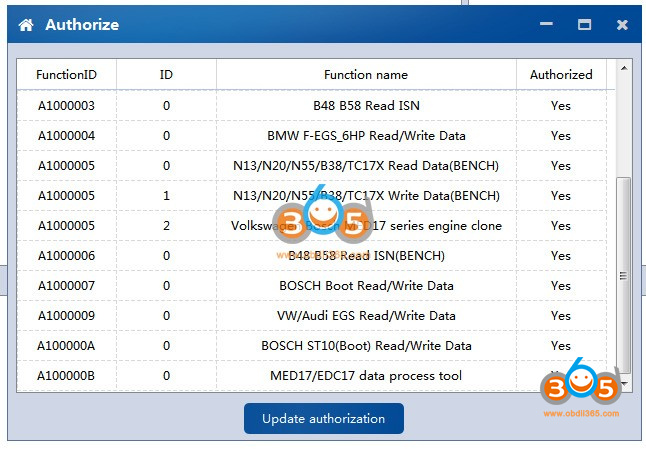
Look at CG FC200 authorization (all free activated):

B48 B58 ISN Read

BMW F-EGS_6HP Read/write data

N13/N20/N55/B38/TC17X Read Data (Bench)

N13/N20/N55/R38/TC17X write data (Bench)

Volkswagen Bosch MED17 series engine clone

B48 B58 read ISN (Bench)

Bosch Boot Read /Write data

VW/Audi EGS Read /Write data

Bosch ST10 (Boot) Read /Write data

MED17/EDC17 data process tool

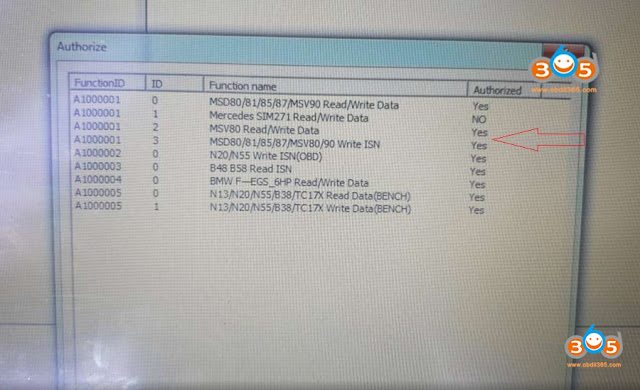
MSD80/81/85/87/MSV90 Read /Write data

Mercedes SIM271 Read /Write data

MSV80 Read /Write data

MSD80/81/85/87MSV80/90 Write ISN

N20/N55 Write ISN (OBD)

CGDI-FC200- license 1

CGDI-FC200- license 2


FC200 supports both BMW ECU and over three thousands of ECUs reading and writing:

https://www.obdii365.com/upload/pro/21081016286461627418.xls


For more details on CG FC200, read CG FC200 user manual:

https://www.obdii365.com/upload/pro/21081016286460858141.pdf


And this page contains all CG AT200 authorization (optional and need to pay extra)

https://www.obdii365.com/producttags/cg-at200.html

Including

-MSV90 MSD85 MSD87 N2055 B38 B48 ECU Data reading, writing and clone

-BMW MSD80 MSD81 MSD85 MSD87 MSV80 MSV90 Write ISN, Backup and Restore Data

– Mercedes SIM271 Read/Write Data

– Volkswagen Bosch MED17 Series ECU Clone

– DQ200 Read/Write Data


Alright, this is a simple comparison between CG FC200 and CG AT200, hope it helps!

4/19/2021

Read BMW ECU Mevd17.2 with CG AT200 on Bench

CG AT-200 is able to read BMW ECU Mevd17.2 on Bench in 3 minutes. Please read this article for the procedure.


F22 with N20 engine, took 2 minutes to remove from the car.

cg-at200-read-bmw-ecu-mevd17-1

Connect to one CG AT-200.

cg-at200-read-bmw-ecu-mevd17-2


Look at the wire connected with CG AT-200 and N20 engine box.

cg-at200-read-bmw-ecu-mevd17-3


Connect to one adjustable power supply which can ensure stable voltage.

cg-at200-read-bmw-ecu-mevd17-4


Open AT200 software, select “BMW” and search “mevd” and then select “Bosch MEVD17.2.9 TC1797_N20”.

cg-at200-read-bmw-ecu-mevd17-5


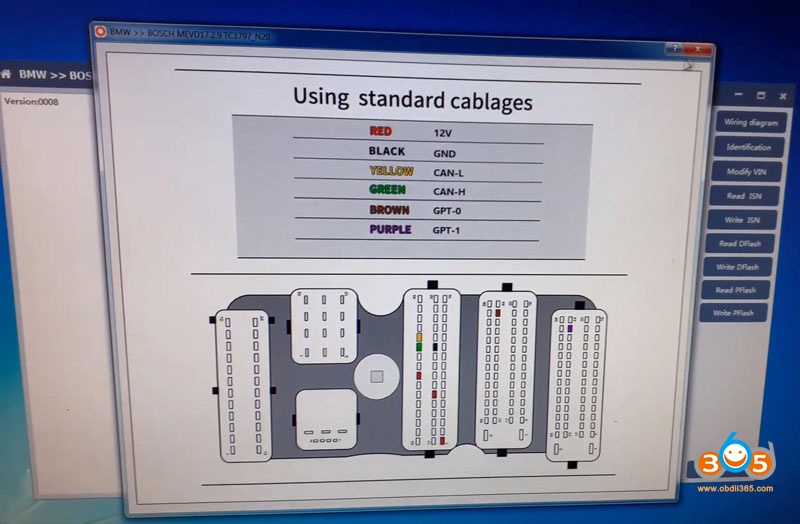
Click on “Wiring Diagram” to refer.

cg-at200-read-bmw-ecu-mevd17-6

cg-at200-read-bmw-ecu-mevd17-7

Click on “Identification” and have the results of chip, serial number, hardware ID…

cg-at200-read-bmw-ecu-mevd17-8


Click on “Read DFLASH” and save the data successfully.

cg-at200-read-bmw-ecu-mevd17-9


Click on “Read PFLASH”, CG AT-200 will take 1 minute to complete, please wait and save the data.

cg-at200-read-bmw-ecu-mevd17-10


Enjoy!


www.obdii365.com

3/02/2021

Experience with AT-200 Clone MSV80 DME

I’d like to share my experience with the AT-200 ECU Programmer and MSV80 unlock upgrade.  I had three codes on a customers’ vehicle that came in 2011 BMW 328Cic:

2E7C BSD (Bit-Serial Data Interface) data bus communications fault

2F71 Digital Motor Electronics (DME): electronics box fan, activation

2B3D Diagnostic Module Tank Leakage (DMTL), system fault


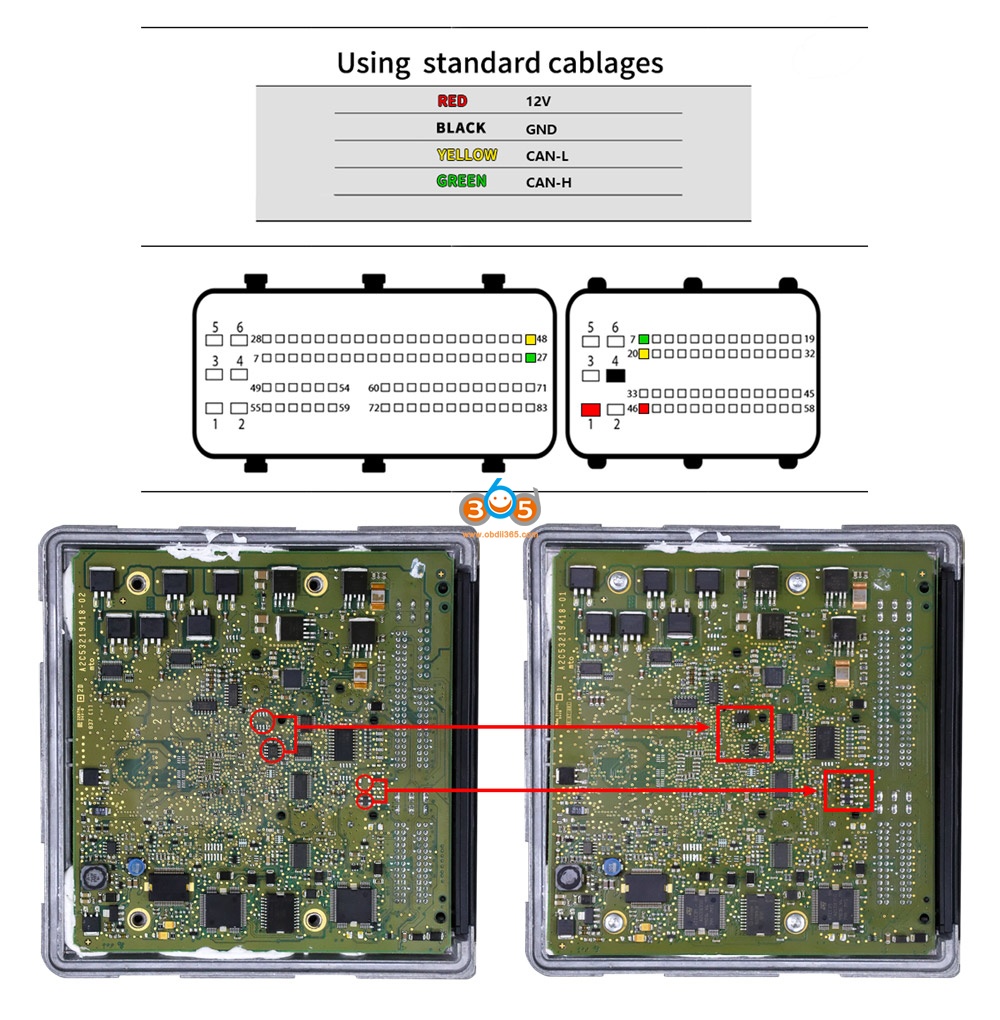
While it’s possible all these present faults could be true, it would still be unlikely so I decided to replace the DME I had used the AT-200 to replace other ECUs without issue and very easily (MSV80 license is required), however, the MSV80 instructions involves soldering chips on to the board and the instructions are just a small resolution image.  I did not know the orientation of the TJA1050 so I used a multimeter and the data sheet of the chip to determine the correct orientation on the board via voltage and ground.  For the other small resistors I did not know the size and ordered them based on guess and parameters given.  They are 1.6mm in length.  I also had to add another CAN-H and CAN-L wire to my AT-200 plug.


Chips I used: 

771-TJA1050T/CM118 TJA1050T/CM,118, 594-MCT06030D2201BP1 MCT06030

D2201BP100, 80-C603C104K5RAC3121 C0603C104K5RAC3121


After adding the chips I had no issue reading ISN, writing ISN, and for me Backup and Writing of the DME I plugged the DME in the car and started it right up without any other ISN changes to CAS or anything else.


at-200-clone-bmw-msv80-dme-1

at-200-clone-bmw-msv80-dme-2

at-200-clone-bmw-msv80-dme-3

at-200-clone-bmw-msv80-dme-4

at-200-clone-bmw-msv80-dme-5

at-200-clone-bmw-msv80-dme-6

Good to know:

  1. Please make the connections shown in the above image 4, because someone feedback he tried to identify the ecu he get the error: connection failed.


  1. You are at your own responsible for any risk when you make the connections by following the above images, because it is from one AT200 user @ wase17.


Alright, hope this article helps those in need and who are curious about this AT-200 ECU Programmer.

1/04/2021

AT-200 Programmer Software Update to V1.8.2

CG AT-200 ecu programmer & ISN code reader released newest software V1.8.2 (2020.12.29).


1.Added MED17/EDC17 Data processing tools(Audi/Seat/Skoda/Volkswagen(VW) 4,5 generation anti-theft) engine data analysis modification
4 generation data:VIN, CS, Status, Anti-theft, MAC, PIN
5 generation data:VIN, CS
2.Added Audi/Seat/Skoda/Volkswagen(VW)/Porsche EGS clone models:
DL382(TC1784), DL501(TC1766), DQ250(TC1766): read and write DFLASH, EXT DFLASH, PFLASH
3. Added ECU(Mini)read and write ISN, VIN: MED17.2, MEV17.2.2, MEVD17.2.2
4. Added ECU(Audi, Citroen, Mg, Seat, Skoda, Volkswagen(VW)) read and write VIN:
MED17.1, MED17.5.5
5. Fix some bugs and optimize software performance
 
 
Free download AT200 V1.8.2

7/27/2020

Easy Way to Read BMW B38 ISN Code with AT-200 and B38 Cable

Here obdii365.com introducts an easier way to read B38 with AT-200 and B38 easy cable set. 
read-bmw-b38-isn-with-at200-moe-cable-1

read-bmw-b38-isn-with-at200-moe-cable-2

read-bmw-b38-isn-with-at200-moe-cable-3
Connect B38 adapter set with AT-200 and 12V power adapter
read-bmw-b38-isn-with-at200-moe-cable-4

read-bmw-b38-isn-with-at200-moe-cable-5
In AT-200 software, select BMW->BOSCH MEVD17.2.3 TC1793_B38
Press Platform
read-bmw-b38-isn-with-at200-moe-cable-6
You can check wiring diagram to connect if don’t have B38 easy cable set. 
read-bmw-b38-isn-with-at200-moe-cable-7
Press identification
Then Read ISN
read-bmw-b38-isn-with-at200-moe-cable-8
Read ISN code success.
read-bmw-b38-isn-with-at200-moe-cable-9


5/26/2020

AT200 V1.7.2 adds more EDC17 MEVD17 ISN Read and Write

AT200 ecu programmer and isn code reader software released to V1.7.2.

AT-200 V1.7.2:
1. Added TC1742 ECU Type below :
Abarth, Alfa Romeo, Ducati, FIAT, Hyundai, Kia, Mahindra, Seat, Skoda, Suzuki, UAZ, Volkswagen(VW)
2. Added TC1782 ECU Type below :
Audi, Citroen, Dacia, FIAT, Ford, Honda, JMC, Nissan, Opel, Peugeot, Renault, Seat, Skoda, Smart, Toyota, Vauxhall, Volkswagen(VW)
3. Added ECU(bmw/Mini) read and write ISN, VIN: EDC17CP45, EDC17CP49, MEVD17.2.H, MEVD17.2.3
4. Fix problem that connection timeout of some ECU (mev17.2) (Need to use B48 platform cable).
5. Fix some bugs and optimize software performance.


5/07/2020

How to Read BMW G Series B48 ISN with AT-200?

CG AT-200 ecu programmer newly updated BMW F and G series B48 B58 ISN reading, EEPROM & FLASH data reading and writing on bench mode.

Example:
AT-200 read B48 G series ISN on bench

Read ISN
Select Brand BMW-> BMW-MG1CS002/MG1CS003_B48/B58_G in AT200 software
at200-read-bmw-b48-isn-1
Check wiring diagram to at200
at200-read-bmw-b48-isn-2
Connect B48 DME ecu with AT-200 via tester cable
at200-read-bmw-b48-isn-3

at200-read-bmw-b48-isn-4

at200-read-bmw-b48-isn-5
Identify DME information
(click to enlarge images)
at200-read-bmw-b48-isn-6
Read ISN
at200-read-bmw-b48-isn-7
Read B48 ISN code successfully.

Read EEPROM & Flash
Press Read EEPROM
Reading eeprom in process
at200-read-bmw-b48-isn-8
Save EEPROM data
at200-read-bmw-b48-isn-9
Press Read Flash
at200-read-bmw-b48-isn-10
Save Flash data
at200-read-bmw-b48-isn-11

Write EEPROM & Flash
Select Write EEPROM and press Yes to write data
Make sure data is backed up.
at200-read-bmw-b48-isn-12
Choose EERPOM bin file save previously
at200-read-bmw-b48-isn-13
Writing EEPROM in process
at200-read-bmw-b48-isn-14
Write EEPROM success
at200-read-bmw-b48-isn-15
Press Write Flash and press Yes to continue
at200-read-bmw-b48-isn-16
Upload flash data saved
at200-read-bmw-b48-isn-17
Write Flash success.
at200-read-bmw-b48-isn-18