Showing posts with label cgdi mb update. Show all posts

5/28/2020

CGDI MB V3.0.1.0 adds V76 Keylessgo Key Reset

CGDI Prog MB software update to V3.0.1.0 on May 28th, 2020. 

CGDI MB BenzMonster V3.0.1.0  NEW  
(2020.05.28)
1. Added CGDI MB keyless go key (76 version) resetting function.
2. Added the function of reading new BGA key to get EIS data.
3. Added operation tutorial viewing function.
4. Added Russian language. (Need to be authorized by dealer).
5. Added W203 ELV writing function.
6. Added the new W164 EIS (special) all key lost collection function. (The number of this W164 EIS is 164545, but the casing is new.)
7. Optimized interface layout and fixed BUG.

Free Download CGDI MB V3.0.1.0 software

5/07/2020

CGDI MB V3.0.0.0 Adds Benz FBS3 FBS4 Odometer

CGDI Prog MB Software V3.0.0.0  NEW (2020.05.06)
 
1. The mileage repair function is now divided into four independent modules:
   FBS3 mileage repair (released)
   FBS4 mileage repair-install hardware filter(-2018) (released)
   FBS4 mileage repair-install software filter (-2018)(this update adds features, need to be used with mileage repair adapter)
   FBS4 mileage repair-restore factory settings (-2018)(this update adds functions, no disassembly)
   The above functional modules require authorization before they can be used, please contact customer service for details.
2. Unified server query interface to optimize network connection stability.
3. Optimize the key reading process for a better experience.
4. The main interface adds technical support contact information.
5. Other optimization and problem repair.
This update is a simultaneous update of the software and the server. The old version of the software will not be available after the new version is released.

3/30/2020

CGDI MB V2.9.5.0 adds Benz FBS4 Mileage Programming

CGDI Prog MB Benz key programmer released new software version v2.9.5.0.

CGDI MB Software V2.9.5.0  NEW (2020.03.30)
1. Added 205, 447 meter mileage repair function.(V850E)
(This update installs a hardware filter version of the instrument, please stay tuned for other types!)
2. Optimized the wiring diagram display.

Free Download CGDI MB V2.9.5.0 software:

CGDI MB Update FBS4 mileage programming
W205 type collective name for 205, 222, 447 and 253 meters

Install the hardware filter version 
Restore the factory setting version
Install the software filter version 

Installing the hardware filter for meter, after modifying the meter mileage by CGDI MB, the mileage in meter will not be synchronized back with the mileage in th EIS. 
cgdi-mb-fbs4-odometer-reset

9/16/2019

CGDI MB Software Update to V2.9.1

CGDI Prog MB Key programmer software update to V2.9.1.

CGDI MB V2.9.1
Fix 21DF Write Key Program. Solve problem that erased keys cannot be written
Fix cannot write key after erase key bugs
Improve key reading speed
Improve EIS reading speed
Add W164(2009-) all keys lost data collection without gateway (without gateway repeated plugging and AC fast collect)
Add W164 (2009-) wiring diagram without gateway
Modify W164 (-2009) AKL wiring diagram without gateway
Modify W203/W463/W639K wiring diagram
Online password calculation in 24 seconds
50% users done within 24 seconds
40% users done within 35 seconds
10% users done within 70 seconds

8/27/2019

CGDI MB V2.9.0.0 adds German French Language

CGDI Prog MB Benz key programmer software update to V2.9.0.0. 
CGDI MB BenzMonster V2.9.0.0  NEW
(2019.08.27)
1. The interface display language added French support.
2. The interface display language added German support.
cgdi-mb-v2900-adds-french-german

7/22/2019

FAQ CGDI MB Download, Update, Activation and Adapter

Here are questions and answers of the cgdi mb programmer, incl.

Part 1: cgdi mb software download
Part 2: cgdi mb activation
Part 3: cgdi mb and eis/elv/nec adapter
Part 4: cgdi mb tokens
Part 5: cgdi mb key programming
Part 6: cgdi mb fbs4
Part 7: cgdi mb review

in detail…

Part 1: cgdi mb software download

How can I get the latest CGDI software?Look at the cgdi official website: http://www.cgprogcar.com/?c=list&ms=download
CGDI programmer don’t come with software. You should go to the official site to download software
cgdi-mb-download
I downloaded CGDI MB software. but the language is Chinese
Go to Setup in the top right corner to change language

I changed the language, from Chinese to English. But not worked. Software still in Chinese.(Error: 中国地区发型版本仅支持简体中文 Only simplified Chinese is available for programmers released in China)
cgdi-mb-language
Pls send me your SN. obdii365.com will help you out.


Part 2: cgdi mb activation

Please help activation CGDI MB. The serial number: MB0004F8 
Ok. will deal with it right now

Activated CGDI programmer myself. But failed. How to do?
You should use the latest CGDI MB software.
cgdi-mb-activation
Can you help CGDI MB activation? What should i provide for the activation?
You should provide info: serial number, user name
Fyi, the default version to activate is the basic ver. if you need an advanced ver., pls tell us before activation.


Part 3: cgdi mb and eis/elv/nec adapter

Can I use Mercedes EIS cables with CGDI?
In theory, yes. But pros working for obdii365.com have not tested yet.

CGDI MB + Xhorse ELV emulator + EIS/ELV cables, can program a emulator elv from eis w207?
Yes. But there might be a compatibility issue of the programmer and emulator. You can try it at your own risk. Pro advise you to use a VVDI MB Tool

CGDI MB error read emulator elv error! Please confirm the connection and continue.
cgdi-emulator
The elv emulator is not connected well. pls check the connection.

If i use the nec adapter with cgdi programmer, is it necessary to do soldering?
cgdi-mb-nec-adapter
Yes. you have to do that.


Part 4: cgdi mb tokens

What’s the meaning of the red and green diamond on the CGDI software?
The red diamond qty: times for password calculation
The green diamond qty: times for key file generation
cgdi-token

Policies About CGMB Tokens

A,New Policy: ( Each day you can get 1 token for free, if you want to continue calculating  password in a day, you can check tips below to get more tokens)
1 Point= 4.6USD, How to get points ?
  • CGDI BMW=2 Points, CGPR0=1 Point, CG100=1 Point ( Remark : Point will be limited per day and 5 points limited which should not show on interface)
  • Providing us an actual HD video for CGDI products to get 1 extra point.
B, Old Policy: 60USD/half year
CGDI MB bought before 1st,June,2018   
  • If you have CGDI MB and CGDI BMW,you can get 4 tokens.
  • If you have CGDI MB,CGDI BMW and CG-PRO, you can get 4 tokens.
  • If you have CGDI MB,CGDI BMW,CGPRO and CG-100, you can get 4 tokens.
  • If you have 2 CGDI MB and CGDI BMW,you can get 4 tokens.
CGDI MB bought after 1st,June ,2018
  • If you have CGMB and CGDI BMW, you can get 3 tokens.
  • If you have CGDI MB ,CGOI BMW and CGPRO, you can get 4 tokens.
  • If you have CGDI MB,CGDI BMW,CG PRO and CG 100,you can get 4 tokens.
  • If you have 2 CGDIMB and CGDI BMW, you can get 3 tokens.


Part 5: cgdi mb key programming

Does CGDI MB support mercedes benz keyless go system?
Yes. in china, most keys are produced without keyless go

Can I use CGDI and EIS cables for gearbox and ecu renew?
CGDI now is able to renew ECU, TCU and ISM.
For more info, pls go to http://www.cgprogcar.com/?c=msg&id=313

Can CGDI program a new key to W164? all keys lost.
CGDI MB all keys lost covers models: w211, w209, w204, w207, w212, w166, w246, w197, w172, w164+, w216, w202, w208, w210, w203, w463, w639, w215, w220 etc
Part 6: cgdi mb fbs4

CGDI MB is able to program Benz key fbs4?
No.  With genuine xentry and daimler fbs server.  Makes FBS4 every day via OBD very fast and easy.
Diagspeed announced the dates of FBS4 solution. But not confirmed yet. The Diagspeed has the reputation of being the best in the Mercedes world to make keys, Reset ECU’s and trouble shoot problems that a normal scan tool can not.  It is worth to take a gamble.

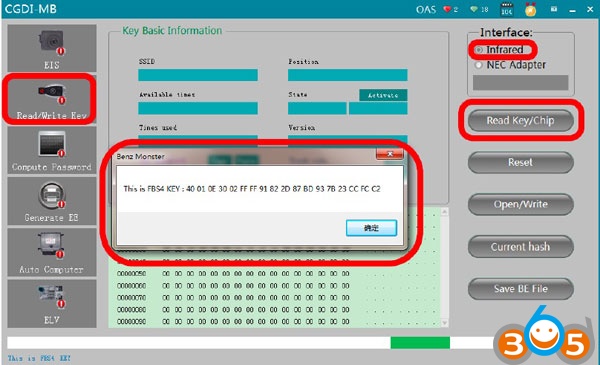
CGDI MB can read FBS4 keys and knows if it’s in a working status or key is damaged
cgdi-fbs4-1

cgdi-fbs4-2


Part 7: cgdi mb reviews

Can you share any good experience with CGDI on Mercedes?


7/06/2019

CGDI MB V2.8.5.0 adds W220 W215 All Keys Lost

CGDI Prog MB Benz key programmer released new software V2.8.5.0 on July 8th, 2019. 

1. Add data collection for W215/W220 all key lost (solve Mercedes S series before year 2006 all key lost issue)
2. Modify cleaning method of car engine computer; (to solve the problem some individual ECU can't be cleared)
3. Replace some wiring diagrams;
4. Software interface layout adjustment;
5. Fix the problem that password may be calculated wrong;
6. Increase Paypal payment function;
7. Modify old 164EIS, 221 EIS all key lost acquisition process; (collect data without gateway)
8. Add K-line EIS wiping function;
9. Add K-line EIS writing function;
10. Add: 220EIS/215EIS/210EIS/208EIS/203EIS/639EIS/906EIS with IR and Infrared to replace EIS directly, world first!
11. Add: 220EIS/215EIS/210EIS/208EIS/203EIS/639EIS/906EIS with IR and Infrared to clear KM Number directly, world first!
12. New Language Released: Spanish
13. Add Mercedes-Benz FBS4 key disable function, support models: 205, 222, 166, 447, 246, 218, etc.


http://www.obdii365.com/wholesale/cgdi-prog-benz-key-programmer.html

5/14/2019

CGDI Prog MB Software and Firmware Update Guide

Both CGDI Prog MB software and firmware can be updated online for free.  The newest version is always available to download free on official website http://www.cgprogcar.com

How to Update CGDI MB software & firmware?
When a new version software is released, the software will prompt "discover update available" and update feature.
Current version 2.8.4.0 (2019/05/10)
update-cgdi-mb-software-1

Press Update Now and wait till the process completed.
update-cgdi-mb-software-2

update-cgdi-mb-software-3


If the device firmware is too old, CGDI software will require to run firmware update
update-cgdi-mb-firmware-1

Click setting icon->Firmware Upgrade
update-cgdi-mb-firmware-2

Update firmware in process
update-cgdi-mb-firmware-3

Firmware update completed.
update-cgdi-mb-firmware-4

Disconnect the USB and reconnect again.
Done.

www.obdii365.com