CGDI MB
reviews:
Have collected CGDI programmers feedback of
tests on Mercedes.
Credits to all contributors off digital-kaos.co.uk
w164:
i
did it today (EIS on bench)
w164
eis A1645451508 new type
pulling dump took 80 minutes
calculating pass online 4 min.
key programmed !!!
w164
eis A1645451508 new type
pulling dump took 80 minutes
calculating pass online 4 min.
key programmed !!!
w164:
W164
need gateway
w164
2006:
Just
did some minutes ago ML350 W164 2006
Read EZS, add key, write BE key all done in 17mn.
Really fast and i'm happy with the first try on car.
Use late software 2.0.0.0
Read EZS, add key, write BE key all done in 17mn.
Really fast and i'm happy with the first try on car.
Use late software 2.0.0.0
w164
2009:
2009
W164 ML450
Key add work
Cgdi 15min
Very good speed!!
Key add work
Cgdi 15min
Very good speed!!
x164 gl 2012:
I
did key x164 GL 2012.
All OK.
All done in 10-12 mn.
All OK.
All done in 10-12 mn.
w164 2009-:
w164
after 2009
I did for testing 2 types of programming _ have got EZS with both programmed keys because customer claimed somethimes EIS works sometimes doesn't - I have found that connector for immo aerial was desoldered from PCB so when I fixed it - EIS became fully working again - and then I started testing CGDI and made 2 types of programming (all programming on bench - EZS + GATEWAY EMULATOR)
1) programming in case one key is available and adding spare key - ALL OK!
2) programming in case of ALL KEYS LOST - ALL OK!
spare key programming was pretty fast
AKL scenario takes circa 80minutes to get data from EIS and You have to plug in and out emulator key every 5 seconds - I have bought VVDI POWER ADAPTER to pass all hassle on to adapter so You don't have to watch whole process and move key in and out manually - but it doesn't work with CGDI - seems adapter works only with VVDI MB and software drives it by adressed pin to switch connection off and on between ezs and key emulator - maybe CGDI TEAM could write a code to their SW and make VVDI POWER ADAPTER useful for all their customers.
I did for testing 2 types of programming _ have got EZS with both programmed keys because customer claimed somethimes EIS works sometimes doesn't - I have found that connector for immo aerial was desoldered from PCB so when I fixed it - EIS became fully working again - and then I started testing CGDI and made 2 types of programming (all programming on bench - EZS + GATEWAY EMULATOR)
1) programming in case one key is available and adding spare key - ALL OK!
2) programming in case of ALL KEYS LOST - ALL OK!
spare key programming was pretty fast
AKL scenario takes circa 80minutes to get data from EIS and You have to plug in and out emulator key every 5 seconds - I have bought VVDI POWER ADAPTER to pass all hassle on to adapter so You don't have to watch whole process and move key in and out manually - but it doesn't work with CGDI - seems adapter works only with VVDI MB and software drives it by adressed pin to switch connection off and on between ezs and key emulator - maybe CGDI TEAM could write a code to their SW and make VVDI POWER ADAPTER useful for all their customers.
w203:
W203
with W209 EZS all key lost, done in the car about 70mn: Succesful.
w203 2004:
W203
2004 spare key making:
Total time about 13 minute when begining to programming new key. Read pass NEC key by IR and calculate PSW
Key still working after get PSW.
Done in car.
Total time about 13 minute when begining to programming new key. Read pass NEC key by IR and calculate PSW
Key still working after get PSW.
Done in car.
w203 2005:
Class
C W203 2005 adding key on car.
Spare key made in under 10 minutes.
Spare key made in under 10 minutes.
w203 G500:
Just
done a Benz G500 imported from Dubai
EZS 203, data collect is longer, but done in 25mn.
Big problem with BE key, writed 3pcs, only one start engine, remote don't work.
Finally write Original NEC black key and get bill.
EZS 203, data collect is longer, but done in 25mn.
Big problem with BE key, writed 3pcs, only one start engine, remote don't work.
Finally write Original NEC black key and get bill.
w204 2010:
W204
2010 adding key on bench
w204:
W204
get data: About hour
PSW W204: 11minute all key lost in bench with VVDI cable
He had VVDI and CGDI, said CGDI is faster and no problem to get PSW:
PSW W204: 11minute all key lost in bench with VVDI cable
He had VVDI and CGDI, said CGDI is faster and no problem to get PSW:
w204:
W204
all key lost on bench:
https://www.youtube.com/watch?v=aI5F...ature=youtu.be
https://www.youtube.com/watch?v=aI5F...ature=youtu.be
w204/w207:
W204/W207
no problem in bench, use with VVDI cable:
Alessandro silva w204 allkey lost ok 100porcetnto
w207:
Alessandro silva w204 allkey lost ok 100porcetnto
w207:
I
did one W207 on bench and only took about 11 minutes total time
w207 c300 2010:
C300
W207 2010 spare key without problem and in 2 minute
(exiting
key is BE, so no need server query PSW)
w209:
Test
with my W209 545 31 08 on bench as add key: 15mn all done
Trying all key lost, failed. But a friend do with W209 545 05 08 succes PSW by IR without gayeway
Trying all key lost, failed. But a friend do with W209 545 05 08 succes PSW by IR without gayeway
w220:
W220
Read EZS and PW from Key
w212:
Tested
on w212 read ezs but pw Upload dont work
Server down
Server down
w212:
Tested
today on W212
Read EZS ---> OBD work Fine
Calulating PW from EZS ---> Work fine Online Server
Key Calculating ---> v041 & v051 Work fine online Server
Read EZS ---> OBD work Fine
Calulating PW from EZS ---> Work fine Online Server
Key Calculating ---> v041 & v051 Work fine online Server
w212 2010 e250:
w212
2012:
tested
w212 ALL KEY LOST !!!
Work realy realy good!
Member say:
W212 is from 2012
Read ezs About 30mins
Upload data
Querry
Password given
Work realy realy good!
Member say:
W212 is from 2012
Read ezs About 30mins
Upload data
Querry
Password given
-
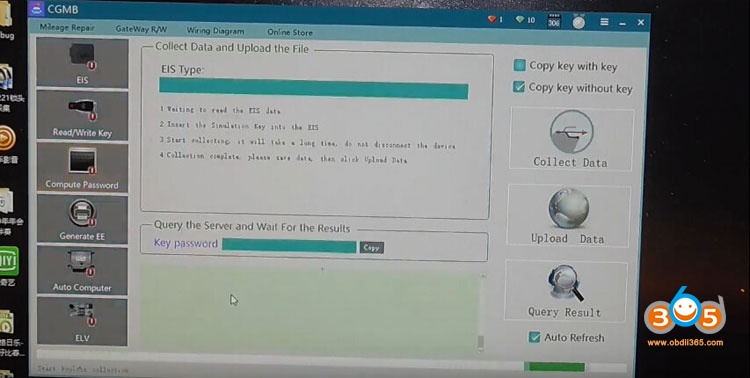
Read eis info
Paste key password
Save
Then key calculation
Read eis info
Paste key password
Save
Then key calculation
w210
w164:
W210
added key on bench
W164 added key on car by OBD 10mn.
Another W164 add key with BE key, 3mn
W164 added key on car by OBD 10mn.
Another W164 add key with BE key, 3mn
w211 2008:
W221
2008 with key v57 from Japan:
Add key success after 30mn, get PSW in the 2è upload.
VVDI or Diagspeed need usual 1 or 2H for that.
Add key success after 30mn, get PSW in the 2è upload.
VVDI or Diagspeed need usual 1 or 2H for that.
w216 2014 w219
2008:
W246
2014 FSB3: Add key successful in 15mn
W219 2008: Add key also 15mn OK
Car from Japan
W219 2008: Add key also 15mn OK
Car from Japan
w221 2007:
2007
w221 from Japan: Add key on bench
First try i use vvdi
But 2 time upload also failed cannot get pass
So i was change device Cgdi from vvdi
1 time upload successful
Good and very fast 10min got pass
First try i use vvdi
But 2 time upload also failed cannot get pass
So i was change device Cgdi from vvdi
1 time upload successful
Good and very fast 10min got pass
w212 2010:
I
add Key on W212 2010 and the System is the same on W204!
All work without problem!
All work without problem!
W463 2012:
password
calculation,
resetting
and recording EZS,
to
change the mileage
successfully.
w906
2010:
Adding
key success on Sprinter W906 2010 with BGA key
On car and by OBD.
On car and by OBD.
w906
w230 2006:
CGDI
work not on all by OBD
W906 Sprinter dont work
W230 SL55 AMG 2006 dont work
W906 Sprinter dont work
W230 SL55 AMG 2006 dont work